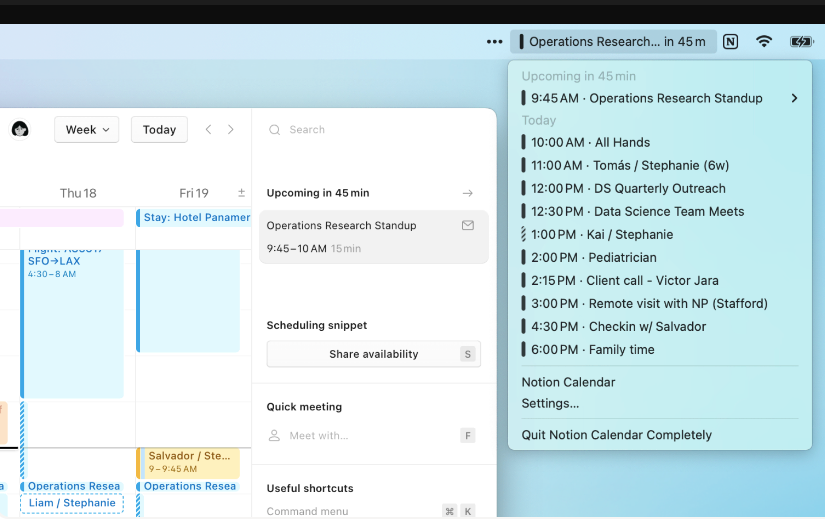
If you’re juggling home, work, and nonprofit board emails. Notion allows you to bring your calendar data into Notion Calendar to give you a unified view of everything going on in your life. Using AI, Notion will even write articles for you within your notes.
To sign up for Notion, go to https://www.notion.so/ and sign up for a free account. It’s a great note-taking system.
Within a Notion note, just click the forward slash / to insert a table, H3 Heading, or leverage integrations with Google Drive, Figma, Loom, Slack, OneDrive, and more. Once signed up, you can access https://www.notion.so from your desktop, mobile, and then clicking Calendar, or by going straight to the calendar URL: https://calendar.notion.so/
It’s free unless you need premium features like AI to help you build notes or articles, just like ChatGPT, ClaudeGPT, or Copy.AI would do.
Key Benefits of Using Notion Overall:
- All-in-one workspace – Notion combines notes, tasks, wikis, and databases in one collaborative platform instead of needing separate apps.
- Flexibility – The workspace can be fully customized to suit personal or team needs. Layouts, views, templates, etc. can be adjusted.
- Relationships and backlinks – Content can be interconnected to show relationships and context, not siloed.
- Productivity features – Tools for task lists, kanban boards, reminders, calendars keep you organized.
- Collaboration – Work and edit shared documents and knowledge bases with others.
- Integration – Connect with other workplace apps to centralize operations in Notion.
- Versatile content – Rich text, images, video, audio, code, and more can be incorporated.
- Apps and automation – Integrate apps to extend functionality and automate workflows.
- Offline access – Workspaces sync across devices for accessibility without internet.
- Security – Encryption, user roles, and permissions keep company data safe.
- Affordability – Lower startup costs than other collaboration platforms on the market.
Overview of Notion Calendar
Notion Calendar allows users to view and manage events and tasks in a calendar format. It syncs with the rest of your Notion workspace, so you can connect calendar events to pages, databases, and other Notion content. The calendar displays visually on both desktop and mobile apps.
Key Features of Notion Calendar
- Integration with Notion – Calendar events, tasks, and schedules are part of your Notion ecosystem. This unified system keeps everything connected.
- Multiple calendar views – Switch between month, week, day, and list views for optimal viewing. Color coding helps you visually organize.
- Event and task creation – Easily add events, schedule meetings, set reminders, and create task lists. Drag and drop to reschedule.
- Offline access – Notion works offline so you can still access your calendar without an internet connection. Syncing occurs when you go back online.
- File attachment – Attach files, photos, audio notes, and other media to your calendar events.
- Shared calendars – Collaborate with others by sharing calendars across your team or organization.
- Apps and integrations – Connect Notion Calendar to other apps like Google Calendar, Slack, Trello, and more.
Key Benefits of Using Notion Calendar
- Unified system – Everything lives in one place instead of toggling between separate apps.
- Flexible formatting – Database capabilities allow for customized calendars and views.
- Collaboration features – Shared team calendars improve coordination and alignment.
- Context and links – Events are enriched with task lists, notes, links, and other details.
- Portability – Access your calendar anywhere with mobile and offline options.
- Visual organization – Color coding and multiple views give visual clarity to your schedule.
- Integration with Notion – Fuller context and links provided by a unified Notion workspace.
Notion Calendar is a powerful scheduling and productivity tool thanks to its smooth integration with Notion and other external calendars like Google, flexible customization, and collaboration features. For teams already using Notion, the calendar is an essential upgrade for task and time management. Even for individual use, it streamlines organizing your days, weeks, and months.