Creating an LLC and addressing the associated business requirements involves several steps. Here’s a structured outline tailored for establishing an LLC in California, obtaining necessary licenses in Torrance, and addressing other relevant items:
1. Form the LLC
- Choose a Name for Your LLC
- Ensure the name is unique and complies with California naming rules. Use the California Secretary of State’s Business Search tool to check availability.
- Add “LLC” or “Limited Liability Company” to the end of the name.
- File Articles of Organization (Form LLC-1) https://bizfileonline.sos.ca.gov/
- Submit the form online, by mail, or in person to the California Secretary of State.
- Fee: $70 (plus an optional $5 if you want a certified copy).
- Appoint a Registered Agent
- Designate an individual or service to accept legal documents on behalf of your LLC.
- Draft an Operating Agreement
- Not required by the state but strongly recommended, especially for a husband-and-wife LLC, to outline management and ownership details.
- Obtain an EIN (Employer Identification Number)
- Apply for free via the IRS website. Required for opening a bank account and hiring employees. https://www.irs.gov/businesses/small-businesses-self-employed/get-an-employer-identification-number
- File a Statement of Information (Form LLC-12)
- Due within 90 days of forming the LLC. Filing fee: $20.https://www.sos.ca.gov/business-programs/business-entities/statements
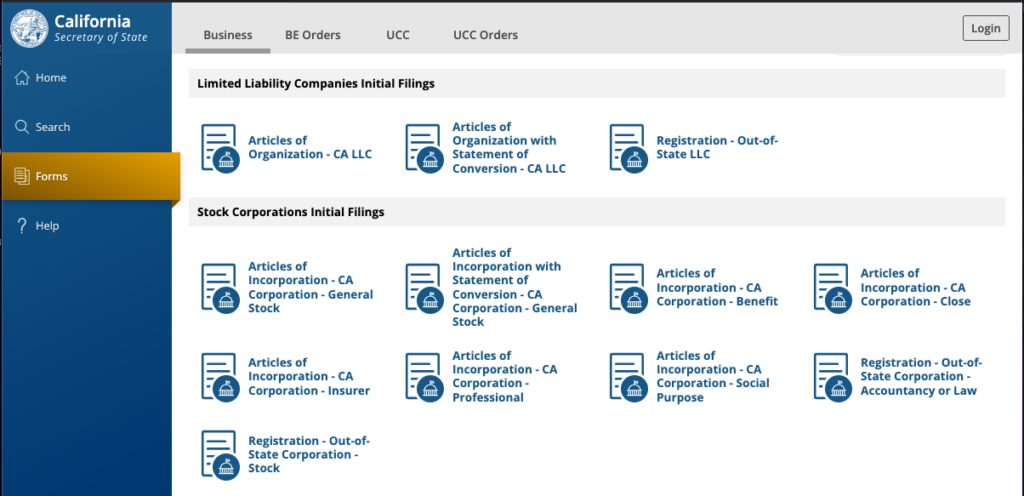
Once your Articles of Organization are approved, go to Bizfile and file your Statement of Information. Go to https://bizfileonline.sos.ca.gov/records/business and click on my records.
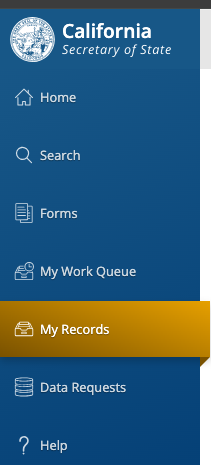
Click into your LLC, and click File Statement of Information. It costs $20 to file the statement.

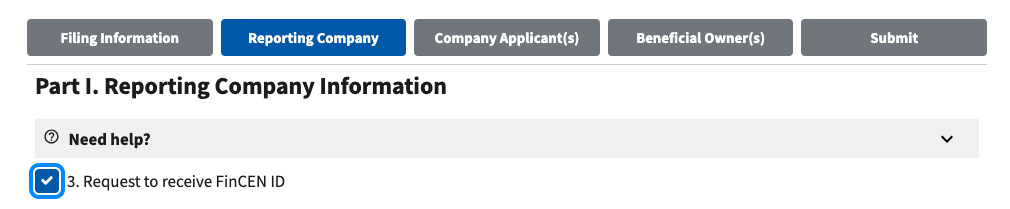
7. Within 90 days of filing your LLC, submit a Beneficial Ownership Information Report (BOIR). Go to https://boiefiling.fincen.gov/fileboir Request to receive a FINCEN ID
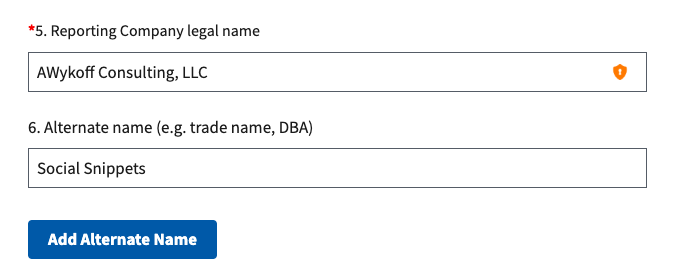
Enter the Reporting Company legal name and the DBA:
3. File a Fictitious Business Name (DBA) with the Los Angeles County Registrar-Recorder/County Clerk (LACRR/CC)
If you plan to operate a business under a name different from your legal business name, you must file a Fictitious Business Name (DBA) with the Los Angeles County Registrar-Recorder/County Clerk (LACRR/CC). This process ensures transparency in business operations and allows the public to identify the individuals or entities behind a business. A key requirement is that you must file your DBA before publishing it in an approved newspaper. Below is a step-by-step guide to help you navigate this process.
Determine If You Need a DBA
A DBA (Doing Business As) is required if your business operates under a name that does not include your legal name or registered business entity name. For example:
- John Doe Consulting does not need a DBA.
- Innovative Tech Solutions (owned by John Doe) does need a DBA.
Additionally, corporations and LLCs may need a DBA if they are conducting business under a name other than the one registered with the state.
File Your DBA with LACRR/CC
You must file your Fictitious Business Name Statement (FBN) with the Los Angeles County Registrar-Recorder/County Clerk before you can publish it in a newspaper.
How to File:
- Online: Some filings may be completed through the LACRR/CC website.
- By Mail: Download the Fictitious Business Name Statement form, complete it, and mail it with the required fee to the LACRR/CC.
- In Person: Visit one of the LACRR/CC offices to file the statement.
Information Required:
- Business name and address
- Business owner’s full legal name and contact information
- Type of business entity (sole proprietorship, partnership, LLC, etc.)
- The county where the business operates
- Signature of the business owner
Fees:
Fees vary but generally range from $26 to $30 for the first business name and additional fees for extra names or owners.
3. Obtain a Business License in the City of Torrance
- Determine Your Business License Requirements
- Visit the City of Torrance Business License Division website or contact them directly to confirm requirements.
- Apply for a Business License
- Submit your application with details about the business activity, ownership type, and location.
- Pay the associated fees, which may vary based on the business type and size.
- Obtain a Business License Supplemental Form for Home Occupations if you’ll be operating out of your home. https://www.torranceca.gov/our-city/community-development/planning/home-occupation
- Obtain Zoning Clearance
- If operating from a physical location, verify compliance with local zoning laws. If you need a building permit, visit the building permit site for your city. https://www.torranceca.gov/our-city/community-development/building/building-permits
4. Publish a Notification in a Newspaper (if required)
- Determine Publication Requirements
- California does not mandate publication for LLCs unless the business operates under a fictitious business name (DBA). If using a DBA, you must file a Fictitious Business Name Statement with the Los Angeles County Clerk. https://www.lavote.gov/home/county-clerk/fictitious-business-names/filing/who-should-file Search for your ficititious business name here https://www.lavote.gov/home/county-clerk/fictitious-business-names/filing/fictitious-business-name-search Note that when they ask for proof of current existence and good standing from the California Secretary of State. Go to the CA Secretary of State website, click on search, search for your company name, and take a screen shot of your company’s good standing. https://bizfileonline.sos.ca.gov/search/business
- Choose an Approved Newspaper
- Select a newspaper recognized by Los Angeles County for legal publications. https://www.lavote.gov/home/county-clerk/fictitious-business-names/publication
- Publish the Notice
- Publish the DBA notice once a week for four consecutive weeks.
- Obtain an affidavit of publication and file it with the county clerk.
5. Obtain a Reseller Permit
- Apply for a Seller’s Permit with the California Department of Tax and Fee Administration (CDTFA)
- Visit the CDTFA website and complete the application online.
- No fee is required.
- Maintain Records for Sales Tax Compliance
- Track sales and purchases to ensure proper tax collection and reporting.
5. Other Items to Address
- Open a Business Bank Account
- Use your EIN and LLC formation documents to establish a dedicated account for business transactions.
- Comply with State and Federal Tax Requirements
- File appropriate tax forms and ensure quarterly estimated taxes are paid (if applicable).
- Obtain Business Insurance
- Consider general liability, professional liability, or other relevant insurance policies.
- Register with the Employment Development Department (EDD)
- Required if you plan to hire employees. Register for payroll taxes.
- Check for Industry-Specific Permits or Licenses
- Verify whether additional licenses are needed for technology consulting or hardware resale.
- Federal Government Contracting If you are doing business with the federal government, get a CAGE code by visiting https://sam.gov/
- Create a Record-Keeping System
- Establish a process for tracking income, expenses, and compliance documents.
6. If You Plan to Hire Employees, File an SEIN
If you plan to hire employees in California, you’ll need to obtain a State Employer Identification Number (SEIN) from the Employment Development Department (EDD). Here’s the step-by-step process:
Obtain a Federal EIN from the IRS
Before applying for an SEIN, you must have an Employer Identification Number (EIN) from the IRS. You can apply online at the IRS EIN Application Portal.
Register for a California SEIN with the EDD
To obtain your SEIN, you must register as an employer with the California Employment Development Department (EDD). You can do this online:
- Visit the EDD’s e-Services for Business website: https://edd.ca.gov/en/e-Services_for_Business/
- Create an account and complete the Online Employer Registration.
- Provide required business details, including your EIN, business structure, and employee details.
- Submit the registration.
Receive Your SEIN
Once registered, the EDD will issue a State Employer Identification Number (SEIN), usually within a few days. You’ll receive this by mail or electronically if you applied online.
Understand Your Employer Tax Obligations
After obtaining your SEIN, you must:
- Withhold and remit payroll taxes (state income tax, unemployment insurance, etc.).
- File payroll tax reports quarterly with the EDD.
- Follow California employment laws (wage, hour, and worker protections).
Register for Other State Requirements (if applicable)
Depending on your business, you may also need to:
- Register for California Sales Tax (if selling taxable goods) with the CDTFA.
- Obtain Workers’ Compensation Insurance if you have employees.
This structured approach ensures your business complies with all state and local regulations and is well-prepared for operations.
7. Get a D-U-N-S® Number
Obtaining a Dun & Bradstreet D-U-N-S® Number is simple and free. Short for Data Universal Numbering System, a D-U-N-S® Number is a unique nine-digit identifier for businesses. It can open many doors for your company, giving you the opportunity to partner with other businesses, receive submit contract bids, and more.
You’ll need to provide:
- Legal business name
- Business address and phone number
- Name of the business owner, president, or CEO
- Legal business structure and date of formation
- Primary industry and number of employees
Go to https://www.dnb.com/duns-number/get-a-duns.html..html to get started.
You’ll need two (2) of the following Required Documents
- Documents must be in your company’s name and company address
- Providing the required documents will help reduce delays
If you’re a Corporation or LLC:
 EIN/TIN Confirmation Letter
Articles of Incorporation
Certification of Amendment of Articles of Incorporation
Certification of Amendment of Articles of Incorporation
Secretary of State Approved Business Registration
Secretary of State Certificate of Filing
If you’re a Sole Proprietor:
EIN/TIN Confirmation Letter
Business License
Professional License
DBA or Fictious Name Certificate
Secretary of State Certificate of Filing
You can also include any of the following, optionally:
Proof of business phone service
Proof of a utility in your company’s name