Management portal documentation: https://www.acronis.com/en-us/support/documentation/AcronisCyberCloud/#about-cyber-cloud.html
Support Portal for Service Providers: https://care.acronis.com/s/support-portal/service-provider?language=en_US
Partner Portal: https://partners.acronis.com/
Acronis Resource Center: https://www.acronis.com/en-us/resource-center/
Introduction to cyber protection: https://www.acronis.com/en-us/support/documentation/CyberProtectionService/index.html
Entra SSO with Acronis: https://learn.microsoft.com/en-us/entra/identity/saas-apps/acronis-cyber-protect-cloud-tutorial
Service Provider UI https://www.youtube.com/watch?v=E3VAj3ZKFaE
Create your first customer tenant: https://youtu.be/QIMljg2tkng?feature=shared
Adding the first device and registering it: https://youtu.be/0FD7W-sxa-A?feature=shared
Creating the first protection plan: https://youtu.be/fnJZH67xZEQ?feature=shared
Onboarding new customers PDF download: https://promo.acronis.com/rs/929-HVV-335/images/MSP_Scenarios_for_evaluation.pdf
Acronis Forum: https://forum.acronis.com/
Acronis Demo Library: https://www.acronis.com/en-us/products/cloud/cyber-protect/demo-center/
Introduction to Cyber Protection: https://www.acronis.com/en-us/support/documentation/CyberProtectionService/index.html
Acronis Management (RMM): https://www.acronis.com/en-us/products/cloud/cyber-protect/management/
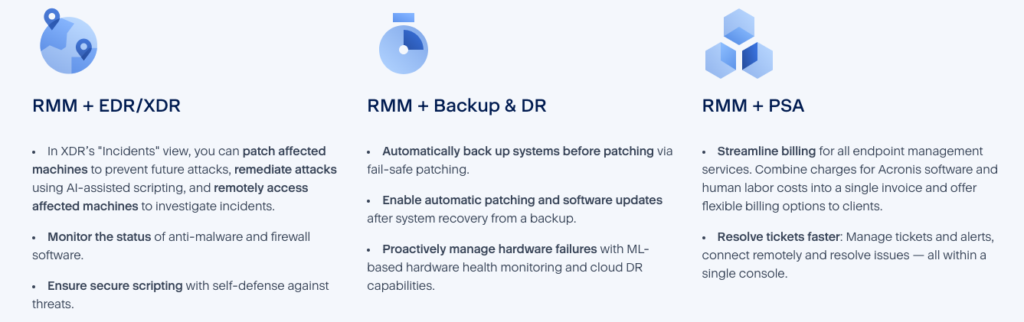
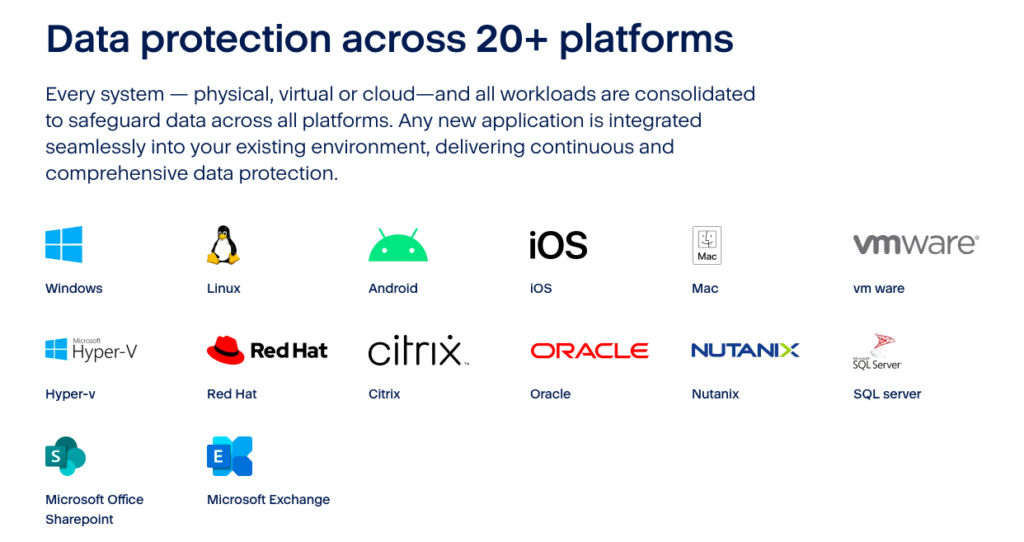
If you prefer to focus on specific topics to learn the Acronis platform, we’ve broken study out on separate pages:
7 Layers of Protection – Acronis Email Security https://infinitekb.com/7-layers-of-protection-of-acronis-email-security/
Acronis Active Protection – https://infinitekb.com/acronis-active-protection/
Acronis Administration – https://infinitekb.com/acronis-administration/
Acronis Advanced Backup Features – https://infinitekb.com/acronis-advanced-backup-features/
Acronis Advanced Email Security – https://infinitekb.com/acronis-advanced-email-security/
Acronis Advanced Management Pack – https://infinitekb.com/acronis-advanced-management-pack/
Acronis Advanced Security+XDR – https://infinitekb.com/acronis-advanced-securityxdr/
Acronis Anti-evasion – https://infinitekb.com/acronis-anti-evasion/
Acronis Anti-spoofing – https://infinitekb.com/acronis-anti-spoofing/
Acronis Application-aware Backups – https://infinitekb.com/acronis-application-aware-backups/
Acronis Audit Log – https://infinitekb.com/acronis-audit-log/
Acronis Automatic Patch Approval – https://infinitekb.com/acronis-automatic-patch-approval/
Acronis Backup Options – https://infinitekb.com/acronis-backup-options/
Acronis Cloud Storage Replication – https://infinitekb.com/acronis-cloud-storage-replication/
Acronis Cloud-to-Cloud Backup – https://infinitekb.com/acronis-cloud-to-cloud-backup/
Acronis Continuous Protection – https://infinitekb.com/acronis-continuous-data-protection/
Acronis Cyber Protect Cloud – https://infinitekb.com/acronis-cyber-protect-cloud/
Acronis Cyber Scripting – https://infinitekb.com/acronis-cyber-scripting/
Acronis Dashboards – https://infinitekb.com/acronis-dashboards/
Acronis Device Sense – https://infinitekb.com/acronis-device-sense/
Acronis Disk Space Usage Monitoring – https://infinitekb.com/acronis-disk-space-usage-monitoring/
Acronis Encryption – https://infinitekb.com/acronis-data-encryption/
Acronis Fail Safe Patching – https://infinitekb.com/acronis-fail-safe-patching/
Acronis File Level Recovery – https://infinitekb.com/acronis-file-level-recovery/
Acronis Group Management of Workloads – https://infinitekb.com/acronis-group-management-of-workloads/
Acronis Impersonation Attack Defense – https://infinitekb.com/acronis-impersonation-attacks/
Acronis Management Console – https://infinitekb.com/acronis-management-console/
Acronis Monitoring and Smart Alerting – https://infinitekb.com/acronis-monitoring-and-smart-alerting/
Acronis Patch Mangaement – https://infinitekb.com/acronis-patch-management/
Acronis Protection Plans – https://infinitekb.com/acronis-protection-plans/
Acronis Quick Assist – https://infinitekb.com/acronis-quick-assist/
Acronis Remote Desktop and Assistance – https://infinitekb.com/acronis-remote-desktop-and-assistance/
Acronis Remote Management Plan – https://infinitekb.com/acronis-remote-management-plan/
Acronis Simplified Management – https://infinitekb.com/acronis-simplified-management/
Acronis Universal Restore – https://infinitekb.com/acronis-universal-restore/
Acronis VMware ESXi Backup and Recovery – https://infinitekb.com/acronis-vmware-esxi-backup-and-recovery/
Acronis Volume Mapping – https://infinitekb.com/acronis-volume-mapping/
Acronis Vulnerability Assessment – https://infinitekb.com/acronis-vulnerability-assessment/
Here’s a list of multiple-choice questions (MCQs) you might encounter while preparing for the Acronis Cloud Tech Associate exam. These questions cover essential areas like Acronis services, architecture, features, and troubleshooting.
1. What is the primary function of the Acronis Cyber Protect Cloud platform?
A. Data encryption and secure storage only
B. Backup and disaster recovery only
C. Integration of data protection, cybersecurity, and endpoint management
D. Network monitoring and penetration testing
Answer: C
https://www.acronis.com/en-us/products/cloud/cyber-protect
2. Which component is responsible for managing backups in Acronis Cyber Protect Cloud?
A. Acronis Agent
B. Acronis Management Console
C. Acronis Storage Gateway
D. Acronis Cyber Infrastructure
Answer: A
How to automate deployment of Acronis agents: https://www.acronis.com/en-us/blog/posts/how-to-automate-acronis-agent-installations/
3. What feature of Acronis allows for continuous data protection (CDP)?
A. Incremental backup
B. Differential backup
C. Real-time backup
D. Active Protection
Answer: C
https://www.acronis.com/en-us/blog/posts/continuous-data-protection
Continuous backup or real-time backup, more commonly known as continuous data protection (CDP), is a process in which every change a user makes to data automatically triggers a backup of that data, essentially recording every version the user saves. The true power of it comes from your ability to restore client data to any point in time without any data loss of critical assets. It is officially defined as “a backup system in which a copy of every change made to a storage medium is recorded as the change occurs.”
Simply put, CDP ensures end-users don’t lose their in-progress work by capturing changes made in real-time. Near CDP versus True CDP Solutions Continuous data protection has evolved into two distinct categories based on recovery point objectives (RPOs), or the maximum allowable amount of time in which data might be lost because of an incident.
4. How does Acronis Cyber Protect Cloud secure data during transfer?
A. Using AES-256 encryption
B. With TLS/SSL protocols
C. Through proprietary compression algorithms
D. By creating encrypted containers
Answer: B
5. Which of the following is NOT a feature of Acronis Cyber Protect Cloud?
A. Patch Management
B. Antivirus and anti-malware protection
C. Server virtualization
D. Vulnerability assessments
Answer: C
6. What is the purpose of the Acronis Cyber Protect Web Console?
A. Monitor real-time cyber threats
B. Manage backup plans and recovery tasks
C. Configure network security settings
D. Deploy software updates across endpoints
Answer: B
7. What is a benefit of using Acronis Active Protection?
A. Prevents DDoS attacks
B. Detects and blocks ransomware activity
C. Provides automatic patch deployment
D. Optimizes storage usage
Answer: B
https://www.acronis.com/en-us/technology/active-protection
Acronis Active Protection is an advanced ransomware protection technology. Completely compatible with the most common anti-malware solutions, our technology actively protects all of the data on your systems, including documents, media files, programs, and more – even your Acronis Cyber Backup files.
8. In Acronis, what does the term “local backup” refer to?
A. Backing up data to a third-party cloud
B. Storing backups on local disks or network shares
C. Synchronizing data with a remote site
D. Archiving data for long-term storage
Answer: B
https://www.acronis.com/en-us/blog/posts/backup-and-restore/#9eeHdUvCpH
9. Which backup type creates a complete copy of the selected data?
A. Incremental backup
B. Differential backup
C. Full backup
D. Synthetic backup
Answer: C
10. What is the primary purpose of the Acronis Storage Gateway?
A. Optimize backup storage utilization
B. Provide access to cloud storage for Acronis backups
C. Accelerate data recovery speeds
D. Configure endpoint security policies
Answer: B
**Note – this is a legacy product.
https://care.acronis.com/s/support-portal/legacy-products/acronis-storage-gateway?language=en_US
11. How does Acronis handle outdated backup versions?
A. Deletes them immediately after new versions are created
B. Compresses and archives them for efficiency
C. Uses a retention policy based on user configuration
D. Transfers them to a secondary storage location
Answer: C
Retention rules: https://care.acronis.com/s/article/68304-Retention-rules-how-and-when-they-work?language=en_US
Retention rules types
- By backup age: define a separate rule for each backup set or use a single rule for all sets
- By number of backups: define the exact number of backups to keep
- By total size of backups: define the size of the archive to trigger retention
- Keep backups indefinitely: retention rules are disabled
The last three rules are generally simple, thus do not require detailed explanation. The focus of the remaining article will fall on the primary rule “By backup age”.
By number of backups: when the number of backups stored inside the archive exceeds the set threshold (maximum amount), the retention rules are applied. Users can choose to apply the retention before or after the backup and can also set the maximum amount of backups to the threshold of 1 (retention after backup) or 0 (retention before backup) to keep only one backup in the archive at all times.
By total size of backups: when the backup archive exceeds the set threshold (maximum size), the retention rules are applied. The software will attempt to remove the oldest backups from the archive until the archive no longer exceeds the threshold or until only one backup is remaining in the archive. If the size of a single backup exceeds the value provided, the archive will exceed the size as well, but will only contain that single backup until the values are modified.
12. What is the recommended way to recover from ransomware with Acronis Cyber Protect Cloud?
A. Use system rollback
B. Perform a malware scan on the affected system
C. Restore from a known good backup
D. Run Acronis Universal Restore
Answer: C
Ransomware recovery strategies: https://www.acronis.com/en-us/blog/posts/ransomware-recovery/
13. Which type of recovery allows restoring to dissimilar hardware?
A. Bare-metal recovery
B. Image-based recovery
C. Universal Restore
D. File-level recovery
Answer: C
https://www.acronis.com/en-us/technology/universal-restore
Universal Restore technology restores your system to any available machine in minutes, regardless of the platform.
Migrate and restore
Migrate systems between physical and virtual platforms quickly and easily. Restore an entire system to new, dissimilar hardware with a few simple clicks Reconnect to your network without reconfiguring your servers
Save time and money
Eliminate the time and money spent on locating identical equipment. Eliminate time spent on system reinstallations and application setups
Fast and easy start
Easily restore systems to a known, working condition quickly and safely, even if you aren’t an IT expert. Get up and running on a new machine in minutes, without worrying about compatibility issues
How does Universal Restore work
Exclusive to Acronis, Universal Restore works behind the scenes to disassociate your backup data from hardware dependencies while still retaining the necessary system data — files, configurations, applications, operating system, and so on.
14. What is the maximum file size supported by Acronis Cloud Backup for individual files?
A. 4 GB
B. 16 TB
C. 100 GB
D. Unlimited
Answer: B
https://care.acronis.com/s/article/Quotas-and-Time-Limits-in-Acronis-Backup-Server?language=en_US
See also sending large files (7-Zip, etc.) https://www.acronis.com/en-us/blog/posts/send-large-files/
15. What feature does Acronis offer to ensure compliance with data protection regulations like GDPR?
A. Data encryption at rest and in transit
B. Activity monitoring and logging
C. GDPR Compliance Assistant
D. Retention policy and data deletion tools
Answer: A
https://www.acronis.com/en-us/gdpr
16. What is the purpose of the Acronis Cyber Infrastructure?
A. To act as a centralized management portal
B. To provide scalable and cost-effective storage for backups
C. To analyze and prioritize system threats
D. To schedule and deploy software updates
Answer: B
https://www.acronis.com/en-us/products/cyber-infrastructure
Acronis Cyber Infrastructure is a multi-tenant, hyper-converged infrastructure solution for cyber protection. Reduce the total cost of ownership (TCO) and maximize productivity with a trusted IT infrastructure solution that runs disaster recovery workloads and stores backup data in an easy, efficient and secure way. Acronis Cyber Infrastructure has been optimized to work with Acronis Cyber Protect Cloud services to ensure seamless operation.
17. Which feature allows Acronis Cyber Protect Cloud to scan for vulnerabilities in operating systems and applications?
A. Threat Intelligence Integration
B. Security Assessment
C. Vulnerability Assessment
D. Active Defense
Answer: C
https://www.acronis.com/en-us/support/documentation/CyberProtectionService/index.html
Cyber Protection represents an all-in-one cyber protection solution that integrates backup and recovery, disaster recovery, malware prevention, security controls, remote assistance, monitoring, and reporting.
It protects your entire business and businesses of your customers through layered protection approach, an innovative combination of proactive, active, and reactive data protection technologies:
- Proactive actions, such as vulnerability assessment/patch management, predictive analysis of hard drive health based on machine learning technologies, allow you to prevent any threats to your machines.
- Active actions, such as protection against malware, self-protection, allow you to detect threats.
- Reactive actions, such as backup and recovery (on-premises and cloud), disaster recovery (on-premises and cloud), allow you to respond to any failures.
Cyber Protection provides you with one protection agent, one Cyber Protect console that is easy to manage, and one protection plan that covers all security and data protection aspects.
18. What does Acronis Disaster Recovery (DR) offer in addition to backups?
A. Real-time ransomware monitoring
B. Fast failover to the cloud in case of server failure
C. Data migration to other storage platforms
D. Integration with external cybersecurity solutions
Answer: B
YouTube on performing a failover: https://youtu.be/ygFcqnrXrn4?feature=shared
19. How can administrators ensure that backup data remains secure during storage?
A. Enable TLS/SSL for data transmission
B. Configure 256-bit AES encryption for stored backups
C. Use multi-factor authentication (MFA) for backup access
D. Regularly rotate storage media
Answer: B
To configure 256-bit AES encryption for stored backups in Acronis, navigate to your backup plan settings, enable the “Encryption” option, and then select “AES 256” as the encryption algorithm, ensuring you create a strong password to protect your backups; this will encrypt all your backups with the highest level of AES encryption available
Security guidelines: https://care.acronis.com/s/article/Acronis-Cyber-Backup-12-5-and-12-security-guidelines?language=en_US
20. Which deployment option is NOT available for Acronis Cyber Protect?
A. On-premises only
B. Cloud only
C. Hybrid deployment
D. Edge-only deployment
Answer: D
21. What is the function of the Acronis Universal Restore feature?
A. Recover deleted files from backup archives
B. Perform a full system restore to the same hardware
C. Restore backup data to a new system with different hardware
D. Sync restored data across multiple devices
Answer: C
https://www.acronis.com/en-us/technology/universal-restore
How does Universal Restore work
Exclusive to Acronis, Universal Restore works behind the scenes to disassociate your backup data from hardware dependencies while still retaining the necessary system data — files, configurations, applications, operating system, and so on.
22. Which backup schedule is most suitable for critical systems with minimal downtime requirements?
A. Weekly full backup
B. Incremental backups every 24 hours
C. Continuous backup
D. Monthly full backup with differential backups
Answer: C
https://www.acronis.com/en-us/blog/posts/continuous-data-protection
23. What is the purpose of Acronis Cyber Notary Cloud?
A. Automating data backups and recovery
B. Verifying data integrity using blockchain technology
C. Encrypting backup archives
D. Auditing access logs for compliance
Answer: B
https://www.acronis.com/en-us/technology/blockchain-notary
Data “Fingerprints”
Acronis Cyber Notary Cloud computes a cryptographic hash, or “fingerprint”, that is unique for each file. This hash is an algorithm that produces the same output when given the exact same input file, making it useful for verifying the file’s authenticity. Any change in the input file, however slight, results in a dramatically different fingerprint. Because the hash algorithm is designed to work only in one direction, it is impossible to determine the original file inputs from the output alone – making the process tamper-proof.
24. What type of backup captures only changes made since the last full backup?
A. Incremental backup
B. Differential backup
C. Synthetic backup
D. Full backup
Answer: B
Full Vs. Differential Vs. Incremental
https://www.acronis.com/en-us/blog/posts/incremental-differential-backups
What are the three types of backups?
There are three primary data backup strategies — full backup, differential backup, and incremental backup.
- Full backups comprise entire data backup sets, regardless of already existing backups or data change circumstances.
- Differential backups comprise data files that have changed since the most recently completed full backup.
- Incremental backups comprise data files that have changed since the most recently completed full or incremental backup.
25. What is a key benefit of the dual-protection approach in Acronis Cyber Protect?
A. Provides simultaneous cloud and on-premises backups
B. Reduces storage costs by compressing data
C. Scans backups for malware during creation
D. Optimizes backup schedules for critical systems
Answer: A
https://www.acronis.com/en-us/products/true-image/features/dual-protection
Local backups combined with a cloud replication software delivers peace of mind, which is called Dual protection. Acronis makes it easy and efficient by automatically replicating local backups in the cloud. Meaning you do not have to worry about your backup with Acronis real time data replication, which will help you to keep all your old and latest data backed up on time.
26. Which report type is available in Acronis Cyber Protect Cloud for administrators?
A. Threat Response Analysis
B. Backup Status Report
C. Compliance Risk Assessment
D. Endpoint Resource Usage
Answer: B
How to create a scheduled report: https://care.acronis.com/s/article/Acronis-Backup-Advanced-How-to-create-scheduled-report-about-last-backup-status?language=en_US
27. What does Acronis Cyber Protect’s AI-based threat detection analyze?
A. File integrity during backup
B. Endpoint behavior to detect anomalies
C. User credentials for phishing attempts
D. Software patching progress
Answer: B
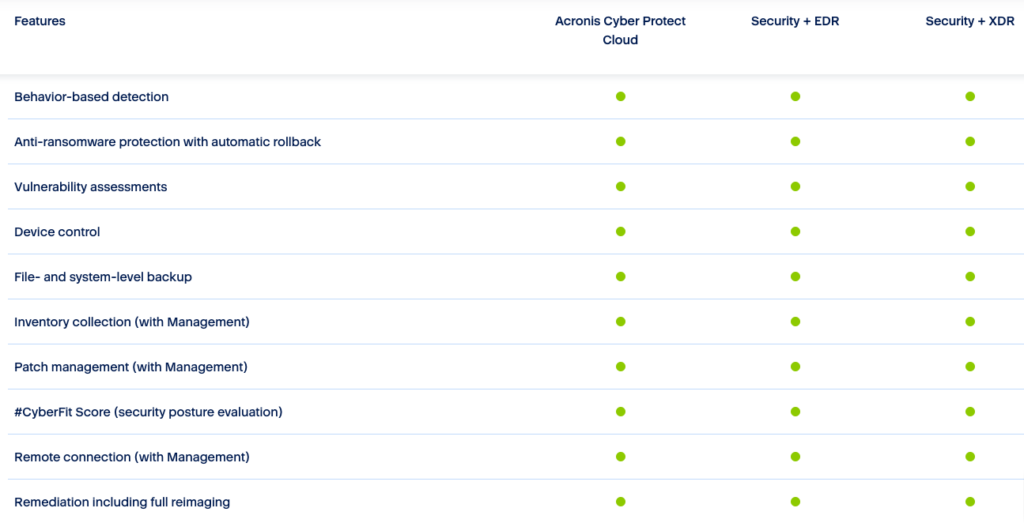
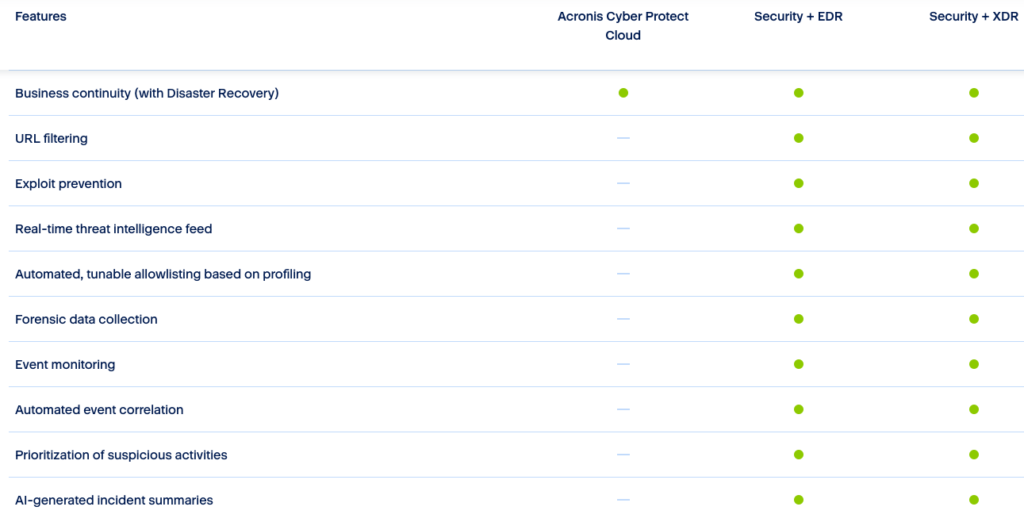
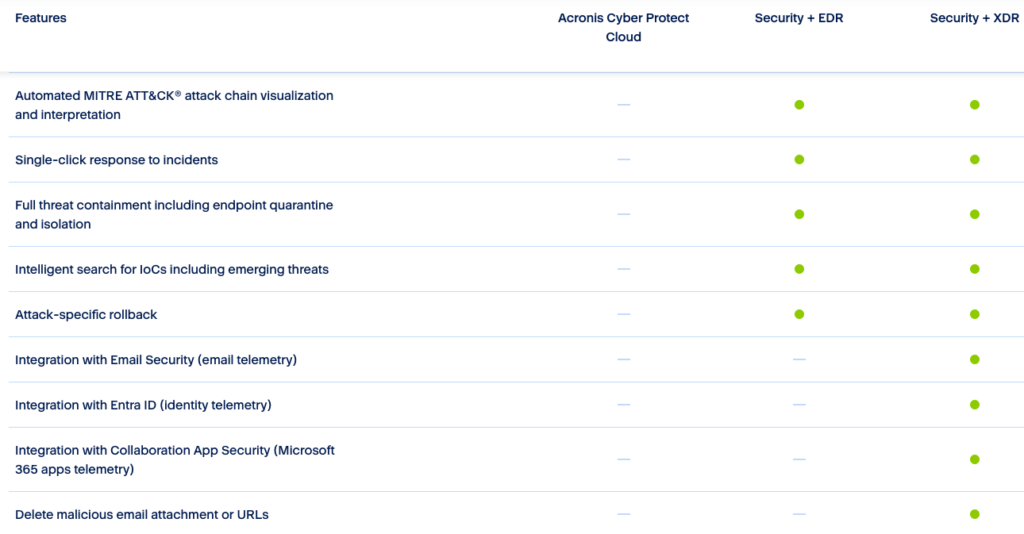
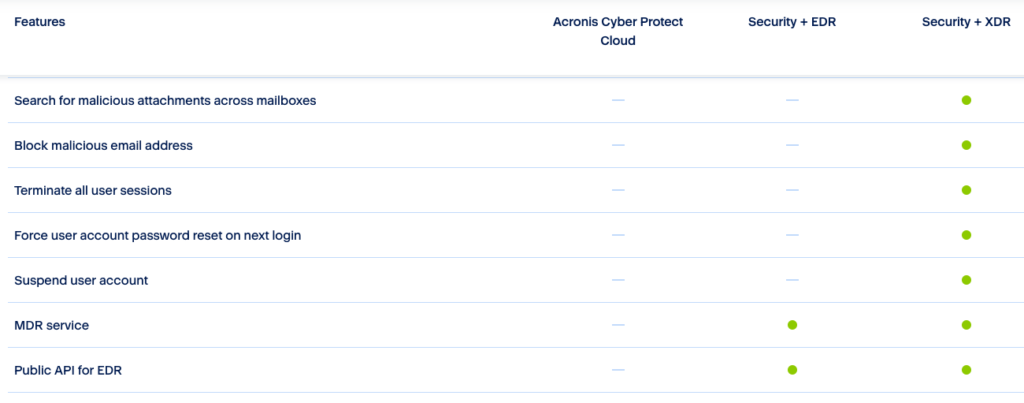
EDR: https://www.acronis.com/en-us/products/cloud/cyber-protect/security-edr/
28. How does Acronis Cyber Protect handle detected malware during a recovery operation?
A. It skips restoring infected files
B. Automatically removes malicious files
C. Quarantines threats and logs the action
D. Performs real-time disinfection before restoration
Answer: D
Introduction to cyber protection: https://www.acronis.com/en-us/support/documentation/CyberProtectionService/index.html
29. What is the benefit of using Acronis Instant Restore?
A. Immediate data recovery to a new system
B. Running a backup image directly as a virtual machine
C. Automatic repair of corrupted backup files
D. Faster synchronization with cloud storage
Answer: B
Running a virtual machine from a backup (Instant Restore) documentation: https://www.acronis.com/en-us/support/documentation/CyberProtectionService/index.html
30. What technology does Acronis use to create bootable media for recovery?
A. Active Disk Cloning
B. Universal Boot Builder
C. Acronis Bootable Media Builder
D. Virtual Recovery Environment
Answer: C
https://www.acronis.com/en-us/support/documentation/AcronisCyberBackup_12.5/index.html
31. Which of the following describes Acronis Continuous Data Protection (CDP)?
A. A backup that runs automatically on a preset schedule
B. A real-time backup that captures every change to data
C. A feature that validates data backups using blockchain
D. A policy to retain only the most recent backups
Answer: B
https://www.acronis.com/en-us/blog/posts/continuous-data-protection
Continuous backup or real-time backup, more commonly known as continuous data protection (CDP), is a process in which every change a user makes to data automatically triggers a backup of that data, essentially recording every version the user saves. The true power of it comes from your ability to restore client data to any point in time without any data loss of critical assets. It is officially defined as “a backup system in which a copy of every change made to a storage medium is recorded as the change occurs.”
Simply put, CDP ensures end-users don’t lose their in-progress work by capturing changes made in real-time. Near CDP versus True CDP Solutions Continuous data protection has evolved into two distinct categories based on recovery point objectives (RPOs), or the maximum allowable amount of time in which data might be lost because of an incident.
- Near CDP – When some data loss is tolerable, near CDP is acceptable. These are typically limited to a certain number of backups so that any earlier versions would be overwritten.
- True CDP – When acceptable RPOs are zero, true CDP continuously backs up data with every change. True continuous backup systems record everything in a changelog on the CDP system, thereby keeping all changes before an incident affects your clients’ employees, so you can restore to any point before their data was corrupted or lost.
32. Which feature in Acronis ensures systems are patched and up-to-date?
A. Vulnerability Assessment
B. Active Protection
C. Patch Management
D. Threat Intelligence
Answer: C
Deep dive into automated patching with Acronis Advanced Management: https://www.acronis.com/en-us/blog/posts/deep-dive-into-automated-patching-with-acronis-advanced-management
Acronis Advanced Management offers a simple, automated patching solution that can help MSPs resolve their patch management challenges.
For modern MSPs, it is not only about patching faster, but patching smarter to boost efficiency and reinforce security for clients. Acronis Advanced Management simplifies the patch management process by automating vulnerability assessment and patch deployment. With over 300 applications supported, Acronis’ vulnerability assessment and automated patch management can identify vulnerabilities and close security gaps automatically, reducing the burden on technicians and enhancing productivity.
The solution starts with a vulnerability assessment, in which MSPs can select the devices to be targeted for scanning and patching. The assessment scope includes Linux packages, Microsoft products, Windows third-party products, Apple products and macOS third-party applications. The scan schedule can be customized to run at specific times, such as every Monday and Wednesday at 11:00 a.m.
33. How does Acronis Cyber Protect Cloud optimize backup storage usage?
A. By deduplicating redundant data across backups
B. By automatically compressing all backup files
C. By deleting backups older than 30 days
D. By moving backups to low-cost cloud storage
Answer: A
Deduplication Overview: https://www.acronis.com/en-us/blog/posts/deduplication/
Backup deduplication technology helps reduce storage costs and network bandwidth utilization by eliminating duplicate data blocks when you back up and transfer data.
Deduplication helps you to:
- Reduce storage space usage by storing only unique data
- Eliminate the need to invest in data deduplication-specific hardware
- Reduce network load because less data is transferred, leaving more bandwidth for your production tasks
Remember, however, that deduplicated storage may require more computing resources, such as RAM and/or CPU. In some use cases traditional non-deduplicated storage may be more cost-effective than deduplicated. You should always analyze your needs and infrastructure before implementing deduplication.
34. What is the role of the Acronis Cyber Backup Agent?
A. To schedule and deploy software patches
B. To enable backup and recovery on endpoints
C. To encrypt data at rest in cloud storage
D. To provide access to centralized management tools
Answer: B
Support portal: https://care.acronis.com/s/support-portal/service-provider?language=en_US
Mass deployment of agents: https://care.acronis.com/s/article/60137-Acronis-Cyber-Backup-12-5-mass-deployment-and-update-of-Agents-for-Windows
35. What happens when a backup plan configured in Acronis Cyber Protect Cloud is interrupted?
A. The entire backup fails and must be restarted
B. Backup automatically resumes from the last successful point
C. Partial backup is discarded and marked as failed
D. A report is generated and sent to the administrator
Answer: B
Troubleshooting backup issues: https://care.acronis.com/s/article/46205-Acronis-Software-Troubleshooting-Scheduled-Backup-Issues?language=en_US
36. Which of these backup types requires the least amount of storage space?
A. Full backup
B. Incremental backup
C. Differential backup
D. Synthetic full backup
Answer: B
https://www.acronis.com/en-us/blog/posts/incremental-differential-backups
There are three primary data backup strategies — full backup, differential backup, and incremental backup.
- Full backups comprise entire data backup sets, regardless of already existing backups or data change circumstances.
- Differential backups comprise data files that have changed since the most recently completed full backup.
- Incremental backups comprise data files that have changed since the most recently completed full or incremental backup.
37. What is Acronis Advanced Disaster Recovery (DR)?
A. A feature that ensures data integrity during transfer
B. A service enabling failover to a secondary data center
C. A backup tool for small businesses only
D. A scanning tool for identifying vulnerabilities
Answer: B
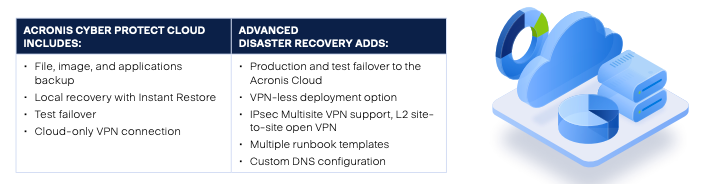
https://www.acronis.com/en-us/products/cloud/cyber-protect/disaster-recovery
PDF 2-pager: https://dl.acronis.com/u/rc/Data-Sheet-Acronis-Cyber-Protect-Cloud-Advanced-Disaster-Recovery-EN-EU.pdf
38. How does Acronis verify the authenticity of files or backups?
A. Acronis Blockchain Validator
B. With a checksum
C. Acronis Active Protection
D. Acronis Recovery Validator
Answer: B
39. What distinguishes a synthetic full backup from a traditional full backup?
A. Synthetic full backup requires more storage space
B. Synthetic full backup combines previous backups to create a full backup
C. Synthetic full backup runs faster but stores uncompressed data
D. Synthetic full backup is created directly from endpoint devices
Answer: B
https://www.acronis.com/en-us/blog/posts/incremental-differential-backups
Synthetic full backup
Back in the day, backup administrators would use the time between the end of the current workday and the start of the next as a backup window to complete all necessary backups. However, modern organizations handle more extensive data volumes and operate round-the-clock, effectively ” erasing” the backup window.
Instead of reading and copying data from primary storage, the synthetic backup method uses (reads) the last full backup and subsequent incremental backups to create a synthetic full backup. Companies can leverage this methodology to avoid creating traditional full backups and thus minimize the impact on network performance and day-to-day processes.
40. What is the default retention period for Acronis Cloud Storage backups?
A. 7 days
B. 30 days
C. 1 year
D. Configurable based on user requirements
Answer: D
41. Which feature allows restoring individual files from a full disk image backup?
A. File-level Recovery
B. Disk Browsing Tool
C. Data Extraction Wizard
D. Incremental Recovery
Answer: A
File recovery how-to: https://www.acronis.com/en-us/blog/posts/how-to-restore-individual-files/
42. What is the role of the Acronis Cyber Cloud API?
A. To provide remote access to endpoints
B. To integrate Acronis with third-party applications
C. To deploy software patches automatically
D. To enable blockchain-based data validation
Answer: B
Bash basics for Acronis API: https://www.acronis.com/en-us/blog/posts/getting-started-bash-basics-for-acronis-cyber-platform-api-operations/
Cyber platform API with Python: https://www.acronis.com/en-us/blog/posts/getting-started-with-acronis-cyber-platform-api-using-python/
43. What is the purpose of Acronis Drive Cleanser (Discontinued)?
A. Compress and encrypt backups for efficiency
B. Safely and permanently delete sensitive data
C. Verify the integrity of backup data
D. Recover files from corrupted backups
Answer: B – You won’t see this on the exam.
44. Which of the following backup types takes the longest time to complete?
A. Full backup
B. Incremental backup
C. Differential backup
D. Synthetic full backup
Answer: A
45. What happens when Acronis Active Protection detects ransomware activity?
A. It sends an alert to the administrator
B. It immediately blocks the malicious process
C. It restores affected files from the last backup
D. It reboots the system to eliminate the threat
Answer: B
Acronis Active Protection is specifically designed to detect and actively protect against ransomware activity by continuously monitoring a system for suspicious behaviors and patterns that could indicate a ransomware attack, using techniques like behavioral analysis and machine learning to identify potential threats in real-time
If ransomware begins to encrypt files, Acronis quickly detects and halts this process. Because Acronis is a backup solution, any data that was exposed and encrypted before the process was halted can be recovered from a variety of backup sources.
Active Protection overview: https://www.acronis.com/en-us/technology/active-protection/
46. What is Acronis Instant Restore primarily used for?
A. Booting a backup image as a virtual machine for testing or disaster recovery
B. Quickly restoring individual files from a cloud backup
C. Running a backup verification process
D. Syncing local backups with Acronis Cloud
Answer: A
Instant Restore: https://www.acronis.com/en-us/support/documentation/CyberProtectionService/index.html
You can run a virtual machine from a disk-level backup that contains an operating system. This operation, also known as instant restore, enables you to spin up a virtual server in seconds. The virtual disks are emulated directly from the backup and thus do not consume space on the datastore (storage). The storage space is required only to keep changes to the virtual disks.
We recommend that you leave this temporary virtual machine working for up to three days. Then, you can completely remove it or convert it to a regular virtual machine (finalize) without downtime.
As long as the temporary virtual machine exists, retention rules cannot be applied to the backup being used by that machine. Backups of the original machine can continue to run.
Usage examples
- Disaster recoveryInstantly bring a copy of a failed machine online.
- Testing a backupRun the machine from the backup and ensure that the guest OS and applications are functioning properly.
- Accessing application dataWhile the machine is running, use application’s native management tools to access and extract the required data.
47. What is an SLA (Service Level Agreement) commonly used for in Acronis Cyber Protect Cloud?
A. To define the security protocols for backups
B. To guarantee recovery time objectives (RTO)
C. To manage patch deployment schedules
D. To document user access policies
Answer: B
RPO and RTO: https://www.acronis.com/en-us/blog/posts/rto-rpo/
48. Which protocol is used by Acronis to securely transfer data to the cloud?
A. HTTPS
B. FTP
C. TLS/SSL
D. SFTP
Answer: A and C
Acronis uses a variety of security measures to ensure the safe and secure transfer of data to the cloud, including encryption, authentication, and secure protocols. Here’s an overview of the key methods:
1. Encryption
- Data-at-rest encryption: Once data is transferred to the cloud, Acronis encrypts it before storage using strong encryption algorithms, such as AES-256 (Advanced Encryption Standard with a 256-bit key). This ensures that even if someone gains unauthorized access to the cloud storage, the data remains unreadable without the proper decryption keys.
- Data-in-transit encryption: During the transfer process, Acronis encrypts the data as it moves from your local device to the cloud using SSL/TLS (Secure Socket Layer/Transport Layer Security) protocols. These protocols prevent eavesdropping or tampering with the data while it’s being transferred over the internet.
2. Authentication
Acronis uses multi-factor authentication (MFA) to ensure that only authorized users can access and manage their backup data. This adds an extra layer of security by requiring not just a username and password but also a second form of verification (e.g., a one-time code sent via SMS or email).
3. Private Encryption Key
Acronis provides the option for users to manage their own encryption key. This is referred to as “private key management” or “private encryption key” mode. With this option, the user retains control of the key used to encrypt their data, ensuring that even Acronis itself cannot decrypt the data without the user’s key.
4. Secure Communication Protocols
- HTTPS (Hypertext Transfer Protocol Secure) is used for web-based communication to ensure that data is transmitted securely over the internet.
- TLS (Transport Layer Security) is used for secure data exchanges during backup or synchronization processes between the local device and Acronis cloud servers.
5. Data Redundancy and Data Centers
Acronis stores data in geographically distributed, secure data centers. These facilities are often ISO 27001 certified and are designed to offer high levels of physical security, such as surveillance, access control, and fire protection. The data itself is also replicated across multiple data centers, which helps ensure both redundancy and high availability.
6. Compliance with Regulations
Acronis adheres to various industry standards and regulations, such as GDPR, HIPAA, and others, to meet the legal and regulatory requirements for data protection and privacy.
7. Blockchain-Based Data Integrity
For further data security, Acronis integrates blockchain technology to verify the integrity of backups. This ensures that no unauthorized changes have been made to the data after it has been backed up.
8. Secure Data Access
Acronis provides a secure web portal and mobile app for accessing backups. Access to these services requires strong authentication and uses encrypted channels to prevent unauthorized access to backup data.
These layers of security help ensure that your data remains private, secure, and protected from unauthorized access throughout the backup and transfer process to the Acronis cloud.
49. Which of the following describes Acronis Cyber Files?
A. A tool for real-time ransomware protection
B. A secure file sharing and syncing solution
C. A backup service designed for endpoint devices
D. A cloud-based vulnerability assessment platform
Answer: B
Acronis Cyber Files is a secure file access, sync, and share solution designed for businesses. It allows employees to safely access, sync, and share corporate files from any device while providing IT administrators with control over data security and privacy. Key features of Acronis Cyber Files include:
- Secure file access from anywhere and any device
- Easy sharing of documents with colleagues, customers, and vendors
- Integration with existing company infrastructure (Windows File Servers, SharePoint, and NAS devices)
- Creation and editing of Microsoft Office documents and text files
- PDF annotation
- File and folder search capabilities
- Local storage of files and folders on mobile devices for offline access
- Automatic 1- or 2-way sync between server and device
- File encryption using FIPS 140-2 certified in-app encryption
- Support for HTTPS Reverse Proxy password and certificate authentication
Acronis Cyber Files is available as both an on-premise solution and a cloud-based service (Acronis Cyber Files Cloud), offering organizations flexibility in deployment options. The platform is designed to balance employees’ need for productivity across multiple devices with the organization’s requirements for data security, visibility, and compliance
https://www.acronis.com/en-us/products/files/
50. Which recovery option is best for restoring a system to operational status after a complete failure?
A. File-level Recovery
B. Bare-Metal Recovery (Bare-Metal Restore)
C. Differential Restore
D. Synthetic Full Restore
Answer: B
https://www.acronis.com/en-us/blog/posts/bare-metal-restore
51. What is the primary role of Acronis Cyber Backup in a business environment?
A. Protect endpoints from malware
B. Store and archive emails securely
C. Ensure business continuity by protecting and recovering data
D. Provide analytics on storage usage
Answer: C
Acronis Cyber Backup plays a crucial role in protecting and securing business data through comprehensive backup and recovery solutions. Its primary functions in a business environment include:
- Creating and managing multiple copies of critical data to prevent loss due to hardware failures, cyberattacks, or natural disasters.
- Implementing the 3-2-1 backup strategy, which involves creating three copies of data, storing them on two different storage devices, and keeping one copy off-site.
- Providing flexible backup options, including full, incremental, and differential backups, to suit various business needs and optimize storage usage.
- Offering cloud backup and disaster recovery services, enabling businesses to store data remotely and quickly restore operations in case of emergencies.
- Integrating cybersecurity features to protect against threats like ransomware, enhancing overall data protection.
- Supporting multiple platforms and environments, making it versatile for diverse business IT infrastructures.
- Enabling customizable reporting and role-based access management for improved control and oversight of backup processes.
By fulfilling these functions, Acronis Cyber Backup helps businesses maintain data integrity, ensure business continuity, and minimize downtime in the face of potential data loss scenarios.
52. What feature allows Acronis Cyber Protect Cloud to block suspicious processes before they harm the system?
A. Vulnerability Scanning
B. Active Protection
C. Threat Intelligence
D. Behavior-Based Blocking
Answer: B
Acronis Active Protection is an advanced anti-ransomware technology designed to protect files, folders, and backups in real-time2. It uses artificial intelligence and machine learning to detect and prevent ransomware attacks proactively
4. Key features of Acronis Active Protection include:
- Pattern detection: It constantly monitors system behavior for suspicious activities that may indicate a ransomware attack.
- Self-defense mechanism: It protects Acronis processes and backup files from being compromised by ransomware.
- Automatic file recovery: If ransomware manages to encrypt files before being halted, Acronis can recover the affected data from backups1.
- Protection against crypto mining malware: It defends the computer from malware that steals CPU power and network traffic for cryptocurrency mining.
- Whitelist and blacklist functionality: Users can manage permissions for safe applications and exclude specific folders from protection.
- Security dashboard: Allows users to monitor potential threats, blocked activities, and approve trusted applications.
Acronis Active Protection is compatible with most common anti-malware solutions and can be an additional layer of security alongside existing antivirus software. It’s designed to protect against both known and new ransomware variants, including threats like WannaCry and Petya
https://www.acronis.com/en-us/technology/active-protection
53. Which Acronis backup type is best suited for minimal recovery time objectives (RTO)?
A. Incremental backups
B. Full backups
C. Continuous data protection (CDP)
D. Synthetic backups
Answer: C
Acronis Continuous Data Protection (CDP) is an advanced backup feature that automatically records and saves every change made to protected data in real-time. This innovative technology offers several key benefits:
- Near-zero data loss: CDP backs up data changes as they occur, minimizing the risk of losing critical information between scheduled backups.
- Point-in-time recovery: Users can restore data to any specific moment, allowing for granular recovery options.
- Application-specific protection: CDP can be configured to track changes made by specific applications, such as Microsoft Word, ensuring that even minor modifications to important documents are preserved.
- Flexible protection options: Users can choose to continuously protect entire folders, specific files, or changes made by selected applications.
- Seamless integration: CDP works alongside regular backup schedules, creating a comprehensive data protection strategy.
How It Works
Acronis CDP operates by:
- Creating an initial full or incremental backup as a starting point.
- Continuously monitoring selected data for changes.
- Recording modifications in a CDP backup without creating new full backups for each change.
Key Features
- Compatible with Windows 7 and later, and Windows Server 2008 R2 and later.
- Supports NTFS file systems on local folders.
- Integrates with Acronis Cyber Protect Cloud for enhanced cybersecurity.
- Allows for quick data recovery, significantly reducing downtime.
Use Cases
Acronis CDP is particularly useful for:
- Businesses that frequently update critical documents and cannot afford to lose even minor changes.
- Organizations in regulated industries that need to maintain detailed records of data transactions for compliance purposes.
- Companies requiring robust disaster recovery capabilities with minimal data loss.
By implementing Acronis Continuous Data Protection, businesses can achieve near-zero Recovery Point Objectives (RPOs) and ensure that their most critical data is always protected, even between scheduled backups.
54. What technology does Acronis use to verify the authenticity of files?
A. MD5 Hashing
B. Blockchain Notarization
C. Symmetric Encryption
D. Digital Certificates
Answer: B (Acronis Cyber Notary Cloud with Ethereum Blockchain)
https://www.acronis.com/en-us/technology/blockchain-notary
Acronis uses blockchain technology, specifically the Ethereum blockchain, to verify the authenticity of files. This process, known as Acronis Notary, works as follows:
- It creates a digital fingerprint (hash) of the file to be notarized.
- The hash is then stored in the Ethereum blockchain ledger.
- This blockchain-based storage ensures that the file’s authenticity can be independently validated and provides proof that the file existed at a specific date and time.
The verification process can be done in two ways:
- Through the user interface provided by Acronis Cyber Notary Cloud.
- Manually via the blockchain, allowing verification from any device at any time.
This blockchain-based notarization system offers several advantages:
- It provides immutable validation, protecting data against tampering and deletion.
- It allows for verification of whether a file has remained unchanged or has been modified.
- It can confirm that a file is authentic and unchanged from its backup.
Acronis Notary with Blockchain is integrated into Acronis’ software-defined storage and data protection solutions, making it a comprehensive tool for ensuring data integrity and authenticity.
55. What is the advantage of using hybrid cloud backup in Acronis?
A. It eliminates the need for local storage
B. It provides faster data transfer speeds
C. It ensures redundancy by combining on-premises and cloud backups
D. It lowers overall costs by compressing data
Answer: C
Hybrid cloud backup in Acronis offers several key advantages:
Enhanced Data Protection and Security
- Data redundancy: Hybrid cloud backup stores data both on local servers and in off-site cloud data centers, ensuring data availability even in case of local hardware failures or disasters.
- Improved security: The solution provides an additional layer of protection by storing data offsite in the cloud, safeguarding against physical damage or loss of on-premises backups.
- Encryption: Data is encrypted during transmission and at rest, with AES-256 encryption used to secure information.
Flexibility and Scalability
- Adaptable storage: Organizations can choose which data to store locally and which to keep in the cloud, based on factors like sensitivity, compliance requirements, and recovery time objectives.
- Easy scalability: Cloud storage offers virtually unlimited scalability, allowing businesses to expand their backup infrastructure as data grows without purchasing additional on-premises hardware.
Cost-Effectiveness and Efficiency
- Optimized resource usage: Hybrid cloud backup employs incremental backups, compression, and deduplication to minimize network bandwidth load and storage requirements.
- Reduced infrastructure costs: By leveraging cloud storage for long-term, less-frequently accessed data, organizations can reduce expenses associated with on-premises storage capacity.
Improved Disaster Recovery and Business Continuity
- Faster recovery: Cloud-based backups can be easily accessed and restored from anywhere with an internet connection, offering quicker recovery times compared to traditional methods[2].
- Multiple recovery options: Acronis Cyber Protect Cloud provides file and disk-image backup, allowing for recovery of individual files or entire systems as needed.
By combining these features, Acronis’ hybrid cloud backup solution offers a comprehensive approach to data protection, balancing security, flexibility, and cost-effectiveness for businesses of all sizes.
56. Which of the following can Acronis Cyber Protect Cloud detect and remove during a backup?
A. Duplicate files
B. Inactive processes
C. Malware and ransomware
D. Corrupted files
Answer: C
Acronis Cyber Protect Cloud offers advanced malware detection and removal capabilities during backup processes. The solution can detect and remove:
- Traditional malware, including viruses, trojans, and worms.
- Rootkits and bootkits, which are often difficult for traditional antivirus solutions to detect on running systems.
- Zero-day malware and new, previously unknown threats using AI-based behavioral detection.
- Ransomware, including advanced variants, through entropy analysis.
- Potentially unwanted applications (PUAs) such as adware and spyware.
Key Features
- Backup Scanning: Acronis can perform malware scans on full image backups, reducing the load on endpoints and networks.
- AI-based Detection: The solution uses artificial intelligence and behavioral analysis to identify and block emerging threats.
- Forensic Data Collection: It can collect digital evidence and store it securely for post-incident investigations.
By integrating these capabilities into the backup process, Acronis Cyber Protect Cloud ensures that backups are free from malware, reducing the risk of reinfection during data restoration and improving overall cybersecurity posture.
57. What is the key benefit of the Acronis Cyber Notary feature?
A. Tracks changes in backup files
B. Encrypts files during storage
C. Ensures the authenticity of files using blockchain
D. Prevents unauthorized file access
Answer: C
Cyber Notary PDF: https://dl.acronis.com/u/rc/DS_Acronis_Cyber_Notary_Cloud_EN-US_200402.pdf
58. What does the Disaster Recovery failover feature in Acronis provide?
A. Secure access to backup files
B. Instant system recovery through temporary cloud infrastructure
C. Regular vulnerability scans for endpoint protection
D. Scheduled migration of data to on-premises storage
Answer: B
The Disaster Recovery failover feature in Acronis provides a robust solution for business continuity in the event of IT system failures or disasters. Key aspects of this feature include:
Production Failover
- Enables quick and automated failover of a client’s production environment to an offsite server running in Acronis Disaster Recovery Storage or the Acronis Cloud.
- Allows moving workloads from on-premises to the cloud when the original machine becomes unavailable.
- Supports failover for physical and virtual workloads, including Windows and Linux servers, VMs, major hypervisors, and Microsoft applications.
Test Failover
- Allows testing of failover processes in an isolated network environment without affecting production systems.
- Can be scheduled on a monthly or weekly basis for any server, ensuring regular verification of recovery capabilities.
- Helps in creating and refining disaster recovery runbooks.
Key Features
- Near-instant RPOs and RTOs: Achieves Recovery Point Objectives (RPOs) and Recovery Time Objectives (RTOs) of less than 15 minutes.
- Site-to-site VPN connection: Enables secure communication between the local site and cloud site during partial failovers.
- Disaster recovery orchestration: Automates failover procedures using runbooks for increased efficiency.
- Point-in-time recovery: Allows restoration of systems and data to any recoverable point in the past.
Benefits
- Minimizes downtime by quickly spinning up IT systems in the Acronis Cloud.
- Provides full site-to-site connectivity and the ability to recover to similar or dissimilar hardware.
- Increases server recoverability by reducing the complexity of test failovers.
- Helps achieve compliance requirements for disaster recovery.
By offering these capabilities, Acronis’ Disaster Recovery failover feature ensures that businesses can quickly recover their critical systems and data in the event of a disaster, minimizing disruption to operations.
59. Which backup strategy is recommended for reducing backup storage requirements while maintaining data protection?
A. Weekly full backups
B. Full backups with daily incremental backups
C. Daily differential backups
D. Monthly synthetic full backups
Answer: B
Acronis recommends using a combination of incremental and full backups to optimize storage space and backup duration while maintaining effective data protection. This strategy offers several benefits:
Incremental Backups
Incremental backups capture only the changes made since the last backup, which:
- Reduces backup time
- Minimizes storage requirements
- Optimizes network bandwidth usage
Full Backups
Periodic full backups ensure a complete copy of the data is available, providing:
- A comprehensive recovery point
- Easier restoration process for complete system recovery
Additional Optimization Techniques
Acronis solutions also incorporate:
- Data deduplication: Eliminates redundant data across backups
- Compression: Reduces the overall size of backup files
- Intelligent storage management: Utilizes features like versioning for efficient long-term retention
By combining these approaches, organizations can achieve a balance between storage efficiency and comprehensive data protection. This strategy allows for frequent backups without excessive storage consumption, while still maintaining the ability to perform full system recoveries when needed.
60. Which Acronis service supports sharing and syncing files securely across devices?
A. Acronis Cyber Sync
B. Acronis File Cloud
C. Acronis Cyber Files
D. Acronis Backup Gateway
Answer: C
61. What feature of Acronis ensures backup data is encrypted at rest and in transit?
A. Secure File Sync
B. AES-256 Encryption
C. Blockchain Notary
D. Multi-Factor Authentication
Answer: B
62. What is the primary purpose of an incremental backup?
A. To create a full copy of the entire system
B. To save only the changes made since the last backup
C. To merge previous backups into a single file
D. To replace outdated backups with newer versions
Answer: B
The primary purpose of an incremental backup is to efficiently capture and store only the changes made to data since the last backup operation. This approach offers several key benefits:
- Storage efficiency: Incremental backups require less storage space compared to full backups, as they only save modified or new data.
- Faster backup process: By focusing solely on changed data, incremental backups complete more quickly than full backups.
- Reduced network load: Less data needs to be transferred during the backup process, making it ideal for environments with limited bandwidth.
- More frequent backups: The efficiency of incremental backups allows for more regular backup operations without significantly increasing storage requirements.
By capturing only the changes since the last backup, incremental backups provide an effective method for maintaining up-to-date data protection while optimizing resource usage.
63. What role does the Acronis Cyber Protect Management Portal play?
A. Monitors endpoint activity
B. Provides centralized management of backups and security features
C. Configures hardware for universal restore
D. Conducts system audits for compliance
Answer: B
The Acronis Cyber Protect Management Portal plays a central role in administering and controlling the Cyber Protect Cloud platform. Its key functions include:
- Service management: Administrators can enable, configure, and monitor various Cyber Protect services for their tenants.
- User and tenant management: The portal allows for creating and managing user accounts, tenants, and setting up access controls.
- Quota management: Administrators can set and monitor usage quotas for different services, such as backup storage and number of protected devices.
- Reporting and monitoring: The portal provides dashboards and reports on service usage, protection status, and operations.
- Security configuration: It enables setting up security features like two-factor authentication and brute-force protection.
- Agent management: Administrators can configure automatic updates for Acronis agents through the portal.
- Service desk: The portal allows for creating and managing service desk tickets[3].
- Billing and cost estimation: It provides tools for estimating Cyber Protect Cloud costs and managing billing-related aspects.
The Management Portal serves as a centralized interface for partners and administrators to control all aspects of the Cyber Protect Cloud platform, from service provisioning to user management and monitoring.
64. Which feature enables Acronis to quickly spin up a virtual machine from a backup?
A. Synthetic Recovery
B. Instant Restore
C. Disk Cloning
D. Universal Restore
Answer: B
Acronis uses a feature called Instant Restore to quickly spin up a virtual machine from a backup. This technology allows users to:
- Get a virtual machine up and running in seconds.
- Emulate virtual disks directly from the backup.
- Invisibly move data to the host in the background while the VM is already operational.
Instant Restore provides several benefits:
- Minimizes downtime by rapidly spinning up IT systems.
- Enables quick recovery of virtual servers without lengthy restoration processes.
- Allows for testing and verification of backups by quickly creating functional VMs.
This feature is particularly useful for disaster recovery scenarios, allowing businesses to quickly restore operations by spinning up virtual machines from their backups in the Acronis Cloud.
65. What does Acronis Advanced Backup ensure?
A. Faster incremental backups only
B. Integration with cloud service providers
C. Granular recovery and comprehensive backup policies
D. Automated malware scans before backup completion
Answer: C
66. What is the purpose of retention rules in Acronis?
A. To control user access to backups
B. To define how long backup data is stored
C. To automate backup encryption
D. To prevent unauthorized access to cloud storage
Answer: B
Retention rules in Acronis serve several important purposes:
- Limit archive size: They help control the total size of backup archives, preventing them from consuming excessive storage space.
- Set backup lifetime: Retention rules determine how long backups are kept before being automatically deleted.
- Optimize storage usage: By automatically removing older or unnecessary backups, retention rules help maintain efficient use of storage resources.
- Balance storage capacity: They aim to maintain a balance between available storage capacity and the need to retain backups for a specific period.
- Automate cleanup: Retention rules automate the process of removing outdated backups, reducing manual management overhead.
- Customize retention periods: They allow users to set different retention periods for daily, weekly, and monthly backups, providing flexibility in data retention strategies.
- Ensure compliance: Retention rules can be configured to meet data retention requirements for regulatory compliance.
- Manage incremental backups: They handle the deletion of incremental backups while maintaining the integrity of the backup chain.
By implementing retention rules, Acronis helps users maintain an efficient and manageable backup system while ensuring that important data is retained for the necessary period.
67. Which backup recovery method is recommended when migrating to new hardware?
A. File-Level Recovery
B. Universal Restore
C. Continuous Data Recovery
D. Incremental Recovery
Answer: B
https://www.acronis.com/en-us/technology/universal-restore
When migrating to new hardware using Acronis, the recommended backup recovery method is Acronis Universal Restore. This feature is specifically designed to facilitate the restoration of system backups to dissimilar hardware. Here’s why it’s the preferred method:
- Compatibility: Acronis Universal Restore allows you to make the old system bootable on new hardware.
- Flexibility: It enables the recovery of system backups from one machine to another with different hardware configurations.
- Ease of use: The tool is available for free to Acronis customers, making it an accessible option for migrations.
- Comprehensive migration: Universal Restore supports migrating the entire operating system and applications from the old to the new computer.
- Hardware differences: It’s particularly useful when there are significant hardware differences between the source and target machines.
By using Acronis Universal Restore, users can effectively transfer their entire system, including the operating system, applications, and data, to new hardware while ensuring that the system remains bootable and functional on the new configuration.
68. What is the recommended configuration to protect against ransomware using Acronis Cyber Protect?
A. Enable AES-256 encryption
B. Configure regular vulnerability assessments
C. Enable Active Protection with real-time scanning
D. Create synthetic full backups every day
Answer: C
To protect against ransomware using Acronis Cyber Protect, the recommended configuration includes the following measures:
1. Enable Active Protection
- Use Acronis Active Protection to monitor system activities and detect suspicious behavior indicative of ransomware. This feature can automatically halt malicious processes and revert unauthorized changes using cache-based recovery.
2. Regular Backups
- Configure automatic backups to secure cloud storage or external locations. Ensure critical files are backed up frequently to provide recovery options in case of an attack.
- Use full image backups to capture the entire system and incremental backups to save changes efficiently, minimizing storage usage.
3. Anti-Malware and Security Features
- Enable integrated anti-malware protection, including ransomware detection and quarantine, to block threats before they can encrypt files.
- Use URL filtering to prevent access to malicious websites that may deliver ransomware payloads.
4. Patch Management and Vulnerability Assessment
- Regularly update the operating system, software, and Acronis Cyber Protect itself to patch vulnerabilities that ransomware could exploit.
5. Endpoint Protection
- Deploy endpoint protection across all devices in the network to prevent ransomware from spreading laterally. This includes protecting mapped network drives and shared resources.
6. Continuous Data Protection (CDP)
- Configure CDP for critical applications and files to back up every change in real-time, ensuring minimal data loss during an attack.
7. User Education
- Train users on recognizing phishing emails, avoiding suspicious links, and following best practices for cybersecurity.
8. Testing and Recovery Plans
- Regularly test backup and recovery processes using features like test failover in isolated environments to ensure readiness for a ransomware incident.
By combining these configurations with Acronis’ multi-layered security approach, organizations can effectively prevent ransomware attacks, minimize damage, and ensure quick recovery if an attack occurs.
69. What is Acronis Cyber Backup’s primary use case for MSPs (Managed Service Providers)?
A. Provide on-site disaster recovery solutions
B. Offer scalable backup and security services to multiple clients
C. Perform network penetration testing
D. Automate file syncing and sharing
Answer: B
70. What is the main advantage of Acronis Disaster Recovery over traditional backups?
A. Supports file synchronization across devices
B. Guarantees real-time file integrity
C. Provides quick failover and system replication for business continuity
D. Eliminates the need for on-premises storage
Answer: C
The main advantage of Acronis Disaster Recovery over traditional backups is its ability to provide lightning-fast recovery times and ensure business continuity by replicating the entire IT environment, not just the data. Acronis Disaster Recovery achieves a 50% faster Recovery Time Objective (RTO) compared to traditional backups, allowing businesses to minimize downtime and quickly restore operations after a disruptive event.
Unlike traditional backups, which focus solely on saving and restoring data, Acronis Disaster Recovery includes features like instant failover, enabling workloads to be spun up as virtual machines directly from the backup storage. This ensures that critical systems can be operational in seconds, even if the primary environment is unavailable. Additionally, it integrates proactive threat mitigation and global scalability, making it a more comprehensive and efficient solution for modern disaster recovery needs.