The Most Common Conditions for Effective Outreach Sequences
Lemlist has become a go-to tool for modern sales and marketing teams aiming to scale outreach without sacrificing personalization. One of its most impactful features is the use of advanced conditions—logic-based rules that tailor campaign steps based on lead data and behavior. Below is a guide to the most widely used conditions in Lemlist and how to apply them for better campaign performance.
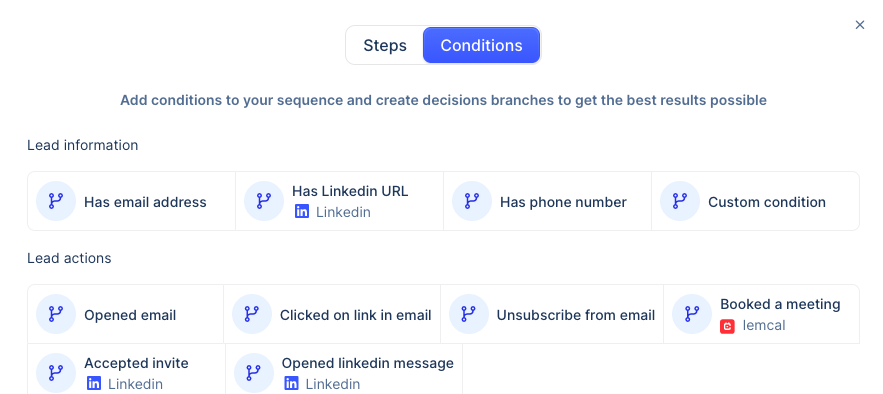
Categories of Conditions in Lemlist
Lemlist conditions fall into two main groups: those based on lead data and those triggered by lead actions.
1. Lead Information Conditions
These rely on the static properties of a contact.
- Has email address: Essential for email outreach, this condition ensures the step only continues if an email is available.
📌 Lemlist Help Center - Has LinkedIn URL: Crucial for building multichannel flows that include LinkedIn steps.
📌 Lemlist Multichannel Guide - Has phone number: Enables users to add calls to their sequence if the number is provided.
📌 SalesHandy Blog - Custom conditions: Lemlist allows for personalized condition creation using custom fields, helping campaigns adapt to unique lead attributes.
📌 Lemlist Blog
2. Lead Action Conditions
These depend on how leads interact with your outreach.
- Opened an email: A classic trigger used to prompt a timely follow-up.
📌 Lemlist Help Center - Clicked a link: Signals interest and can be used to escalate engagement (e.g., booking links or product pages).
📌 Lemlist Templates - Unsubscribed: Prevents further emails from being sent and allows rerouting communication to other channels.
📌 Lemlist Blog - Booked a meeting (via Lemcal): Triggers the next set of actions once a meeting is confirmed.
📌 Lemlist Features Guide - Accepted LinkedIn invitation: This condition is vital in LinkedIn-based workflows to prevent messages from being sent before a connection is established.
📌 LinkedIn Integration Guide
Smart Use Cases for Advanced Conditions
Here’s how teams use these conditions to build smarter, more responsive sequences:
Pause Until LinkedIn Connection is Accepted
Instead of pushing a message immediately, this condition pauses the sequence until the lead accepts a connection request. This avoids awkward or mistimed follow-ups.
📌 Lemlist Multichannel Examples
Branching Based on Engagement
Campaigns can split based on interaction. For example:
- Branch A: If a lead clicks a link, trigger a high-priority follow-up.
- Branch B: If there’s no interaction, shift to a softer touchpoint like LinkedIn messaging.
📌 Lemlist Blog
Instant Call After Email Open
Some users automate a call attempt as soon as an email is opened, capitalizing on the moment of attention.
📌 Lemlist YouTube Walkthrough
Adaptive Multichannel Sequencing
Leads with LinkedIn URLs can be routed through sequences that include invites, messages, and InMails. Others are kept in an email-only path.
📌 Multichannel Strategy Guide
Final Unified Step Regardless of Path
At the end of a campaign, mutual steps ensure all leads—regardless of which branch they followed—receive a concluding message or final reminder.
📌 Lemlist Campaign Design Guide
Why Use Advanced Conditions?
The power of conditions lies in their ability to make outreach personalized, timely, and effective. Key benefits include:
- Hyper-Personalization: Leads feel like the message was crafted for them.
📌 Lemlist Personalization Guide - Higher Conversion Rates: Relevance increases response, booking, and reply rates.
📌 Lemlist Blog - Time Savings: Automates decision-making in sequences so you don’t have to manually check if a lead opened an email or accepted a request.
📌 Lemlist Help Center
Final Thoughts
Using advanced conditions in Lemlist isn’t just a nice-to-have—it’s essential for anyone serious about scaling outreach without losing that personal touch. Whether you’re pausing a sequence until a LinkedIn invite is accepted or branching your outreach based on user clicks, these tools give you unmatched control over the journey each lead experiences.