https://care.acronis.com/s/article/Acronis-Cyber-Protect-Device-Sense?language=en_US
Enhancing IT Management for MSPs
In the ever-evolving landscape of IT management, the ability to efficiently discover, identify, and protect devices within a network is crucial for maintaining security and compliance. Acronis Device Sense™ is a cutting-edge technology that empowers Managed Service Providers (MSPs) to manage their clients’ networks with unparalleled visibility and control. This article explores the key benefits of Device Sense and provides a guide for administrators on how to effectively utilize this feature.
What is Acronis Device Sense?
Acronis Device Sense is designed to streamline the process of managing large numbers of devices within a network. With its dual scanning system—continuous passive scanning and on-demand active scanning—Device Sense offers comprehensive insights into all devices connected to a client’s network, including servers, workstations, smartphones, and network devices like routers and switches. This innovative tool not only enhances visibility but also ensures compliance and efficiency in IT operations.
Key Benefits of Acronis Device Sense
- Comprehensive Device Discovery: Device Sense automatically discovers all devices connected to the network, providing IT managers with a complete inventory. This includes detailed information such as device type, manufacturer, IP address, and more.
- Enhanced Visibility: By offering real-time insights into the entire network landscape, Device Sense allows administrators to monitor device status continuously. This enhanced visibility is crucial for identifying potential security risks and ensuring compliance with industry standards.
- Automated Inventory Management: The automation of device discovery eliminates the need for manual audits, freeing up valuable time for IT teams. Administrators can easily track assets and maintain accurate records without the burden of repetitive tasks.
- Remote Agent Installation: Administrators can remotely install Acronis agents on discovered devices, enabling immediate protection and management at scale. This capability simplifies the onboarding process for new devices.
- Application of Protection Plans: Device Sense allows for the quick application of protection, monitoring, and management plans across multiple devices simultaneously. This ensures that all workloads are adequately protected without requiring individual configuration.
- Detailed Reporting: The system generates comprehensive reports on discovered devices, aiding in accurate network management and compliance tracking. These reports provide valuable insights that can inform future IT strategies.
- Security Posture Improvement: Continuous monitoring and proactive protection measures ensure early detection and resolution of potential issues, enhancing overall system reliability and security posture.
How to Use Acronis Device Sense as an Administrator
Implementing Acronis Device Sense involves several straightforward steps:
Step 1: Access the Acronis Management Console
- Log in to your Acronis Cyber Protect Cloud console.
- Navigate to the Settings section where you can configure device discovery options.
Step 2: Enable Device Discovery
- Under the Passive Device Discovery menu, ensure that passive discovery is enabled by default.
- Set the number of discovery agents per local network according to your organization’s needs (typically set to one).
Step 3: Initiate Scanning
- Allow Device Sense to perform continuous passive scanning to identify all devices connected to the network.
- For more detailed information about specific devices, run an active scan on-demand via the Discovered Devices section.
Step 4: Review Discovered Devices
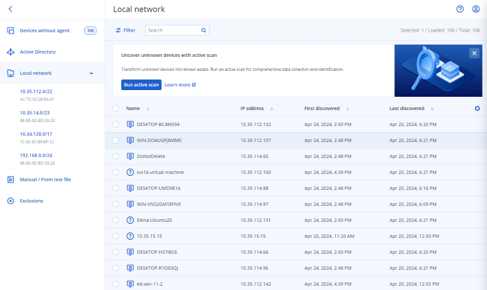
- After scanning is complete, review the list of discovered devices in the Devices → Discovered Devices section.
- Utilize advanced filtering options by device type or IP address to find specific machines quickly.
Step 5: Install Acronis Agents Remotely
- Select one or more discovered devices to install Acronis agents.
- Define actions after registration, such as enabling default protection plans or monitoring plans for targeted workloads.
Step 6: Generate Reports
- Use the reporting features to create detailed reports on device discovery and status.
- Analyze these reports to ensure compliance and identify areas needing attention.
Conclusion
Acronis Device Sense is a transformative tool for MSPs looking to enhance their network management capabilities. By automating device discovery and providing comprehensive visibility into client networks, this feature streamlines operations while improving security posture and compliance adherence.
With its ability to manage large numbers of registered devices conveniently, Acronis Device Sense empowers administrators to focus on strategic initiatives rather than being bogged down by manual processes. Embrace this innovative technology today to elevate your IT management practices and ensure comprehensive protection for your clients’ networks!
** Note – at least one Windows machine with Agent for Windows installed is required to act as the Discovery agent for device discovery in Acronis.
Device Sense™, Acronis’ technology for device discovery, uses a dual scanning system that includes continuous passive scanning and on-demand active scanning. The passive device discovery is enabled by default, with the number of Discovery agents per local network set to one. This Discovery agent is responsible for identifying and cataloging devices in the network.
It’s important to note that:
- The Discovery agent must be installed on a Windows machine.
- At least one such agent is required for the device discovery process to function.
- The agent acts as a central point for scanning and identifying devices within the network.
This requirement ensures that Acronis can effectively discover, identify, and protect every device within a client’s network, providing comprehensive visibility and control over the network environment.