To apply a Remote Management plan to a Linux-based computer using Acronis, several steps and requirements must be fulfilled:
Requirements
- Acronis Cyber Protect Agent: The Acronis Cyber Protect agent must be installed on the Linux machine. This agent allows for remote management capabilities, including remote desktop access and file transfer.
- Agent Plan Creation:
- Navigate to the Management section in the Acronis console.
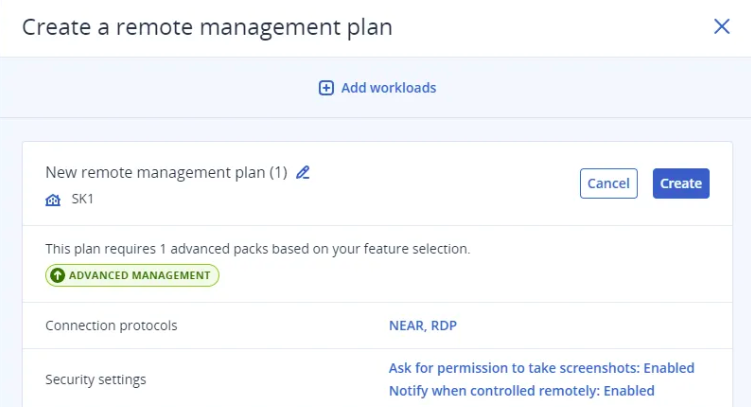
- Create an agent plan that includes settings for remote management. This plan can be customized or kept with default settings.
- Connection Protocols: When creating the agent plan, you can specify connection protocols:
- NEAR Protocol: Acronis’ proprietary protocol that offers secure and low-latency connections.
- RDP (Remote Desktop Protocol): While supported, it’s advised to use NEAR due to RDP’s vulnerability to attacks.
- Workload Selection: After configuring the agent plan, select the Linux workloads to which you want to apply this plan. You can do this by clicking on Add Workloads in the agent plan settings.
- Plan Application: Once the agent plan is created and workloads are selected, click Create to apply the remote management features to the chosen Linux machines.
Connection Process
After applying the Remote Management plan:
- Use the Acronis console to connect to the Linux workload.
- Select the workload and choose from available connection options, which may include control or observation modes depending on your needs.
Summary
In summary, applying a Remote Management plan to a Linux-based computer with Acronis requires installing the Acronis Cyber Protect agent, creating and configuring an agent plan with appropriate protocols, selecting the workloads, and then applying the plan. This setup enables efficient remote management capabilities across your Linux environments.