Best Practices for Learning Amazon KDP for Self-Publishing
Self-publishing through Amazon’s Kindle Direct Publishing (KDP) platform has revolutionized the way authors share their work with the world. Whether you’re an aspiring novelist, a non-fiction expert, or a creator of children’s books, KDP offers a straightforward path to publishing. To maximize your success on this platform, it’s important to follow best practices for learning and using KDP effectively.
1. Start with Amazon’s Official Resources
Amazon provides extensive documentation and tutorials to help new users navigate KDP. Begin with the official KDP Help Page to understand the basics of the platform, from setting up an account to formatting your manuscript.
Key topics to explore include:
- How to format your manuscript for Kindle.
- The requirements for uploading cover art.
- Pricing and royalty options.
- KDP Select and its benefits.
2. Familiarize Yourself with Kindle Formatting
Proper formatting is critical for ensuring your book looks professional on Kindle devices. Amazon’s Kindle Create tool simplifies the process by converting Word documents and PDFs into Kindle-friendly formats.
Tips for success:
- Use styles in your manuscript (e.g., headers and paragraph styles) to create a consistent layout.
- Preview your book on different devices using the Kindle Previewer.
- Test for errors and inconsistencies before publishing.
3. Understand Copyright and ISBN Requirements
Learning about copyright protection and ISBNs (International Standard Book Numbers) is essential for any self-publisher. Amazon provides an overview of ISBNs to help you decide whether to use a free ISBN from KDP or purchase your own.
Important considerations:
- Retain your publishing rights by understanding the terms of KDP.
- If you’re using KDP Select, remember your ebook must be exclusive to Amazon for the duration of your enrollment.
4. Learn the Basics of Book Marketing
Publishing a book is only half the battle; marketing ensures your audience finds it. Amazon’s Marketing Resources explain tools like:
- Kindle Unlimited and KDP Select promotions.
- Amazon Advertising for authors.
- Setting up categories and keywords to optimize your book’s discoverability.
Additional tips:
- Research your target audience to refine your book description and cover design.
- Engage with potential readers through social media and email newsletters.
5. Join the KDP Community and Learn from Others
The KDP Community Forum is a valuable resource for troubleshooting and tips. Here, you can connect with experienced authors, learn from their insights, and share your progress.
6. Experiment with KDP Features
Amazon KDP offers a variety of features to help authors maximize their reach:
- Paperback Publishing: Extend your book’s availability by offering a print-on-demand option.
- Expanded Distribution: Distribute your book to libraries and bookstores.
- KDP Select: Leverage promotional tools like free book days and countdown deals.
7. Stay Updated on Policies and Trends
The publishing landscape evolves constantly. Regularly review Amazon’s Content Guidelines to ensure compliance and explore blogs or courses focused on self-publishing.
Conclusion
Learning and mastering Amazon KDP takes time and dedication, but the effort pays off in the form of a professional-quality book and a global audience. By leveraging official resources, engaging with the community, and staying updated, you’ll be well on your way to becoming a successful self-published author.
Helpful Links:
Documentation on which font to use can be found here: https://kdp.amazon.com/en_US/help/topic/G202145450#:~:text=Times New Roman and Arial are recommended for body text.
https://kdp.amazon.com/en_US/help/topic/GVBQ3CMEQW3W2VL6
406 Pages
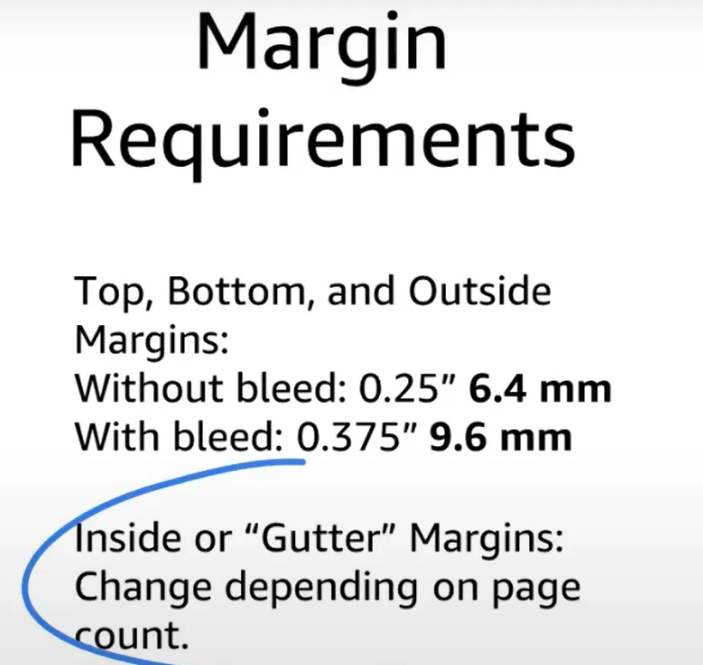
Margin requirements for your KDP book
For 406 pages, use .625 in for the inside (gutter) margins and .25 for outside margins without bleed. Bleed is required for a book where the images to to the edge of the page, like for a cookbook.

https://kdp.amazon.com/en_US/help/topic/GLRF8JDXY5LPE3TX
Margins:https://kdp.amazon.com/en_US/help/topic/GLRF8JDXY5LPE3TX
Change default margins
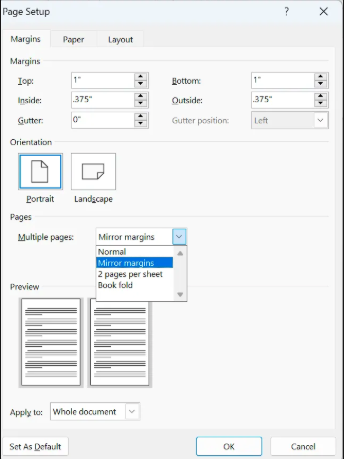
- Select Layout > Margins > Custom Margins.
- Set your margins.
- Select Set As Default.
- Confirm your selection.
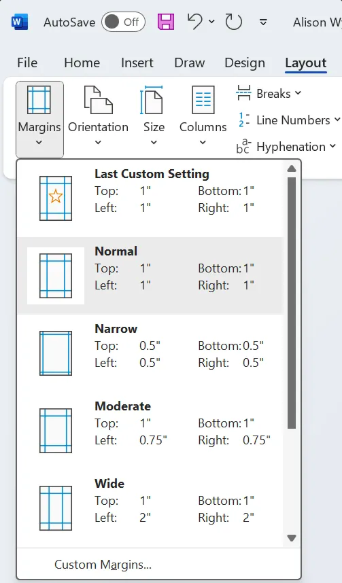
Page size and margins quick KDP YouTube video: https://www.youtube.com/watch?v=9QO_yF7UnpU
Dropdown mirror margins
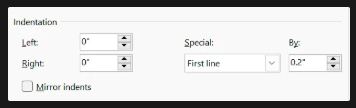
Indent the first paragraph: https://www.youtube.com/watch?v=uRITOVV-aac&t=323s
Click the Home tab, the down arrow in the lower right next to where it says paragraph.
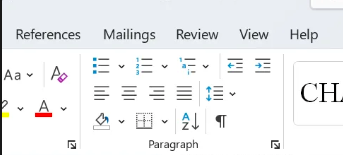
For line spacing, use 1.5
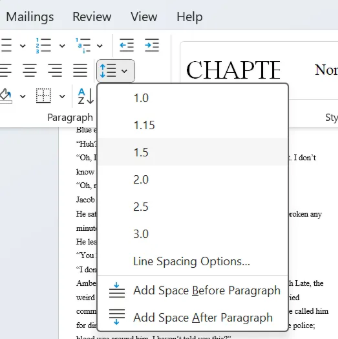
Set paragraph indentations and line spacing: https://kdp.amazon.com/en_US/help/topic/G200645680
Click the Home tab, the down arrow in the lower right next to where it says paragraph.
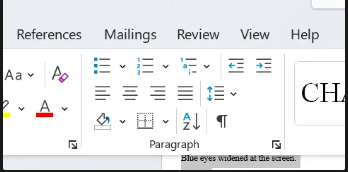
Set the first paragraph indent to .2