https://www.examcompass.com/comptia/a-plus-certification/free-a-plus-practice-tests 90 Questions
CompTIA A+ Practice Questions
Cybrary. https://app.cybrary.it/immersive/13310178/activity/35439 2 test exam. 2001 and 2002
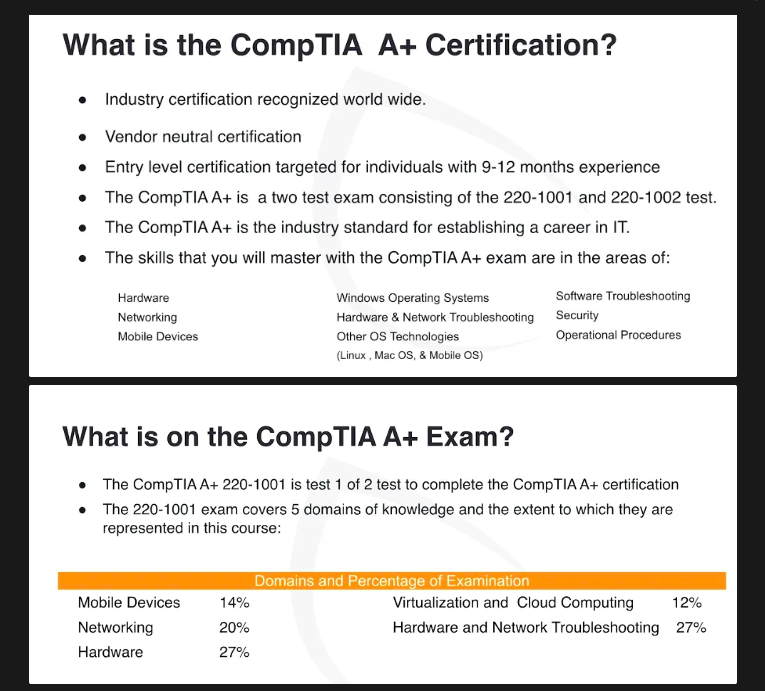
The CompTIA A+ Core Series requires candidates to pass two exams:
Core 1 (220-1101) and
Core 2 (220-1102) covering the following new content, emphasizing the technologies and skills IT pros need to support a hybrid workforce.
- Increased reliance on SaaS applications for remote work
- More on troubleshooting and how to remotely diagnose and correct common software, hardware, or connectivity problems
- Changing core technologies from cloud virtualization and IoT device security to data management and scripting
- Multiple operating systems now encountered by technicians on a regular basis, including the major systems, their use cases, and how to keep them running properly
- Reflects the changing nature of the job role, where many tasks are sent to specialized providers as certified personnel need to assess whether it’s best to fix something on site, or to save time and money by sending proprietary technologies directly to vendors
System Unit Hardware
Motherboard Types and Features
RAM Types and Features
PC Expansion Cards
Storage and Media Devices
Basic PC Maintenance
CPU Types and Cooling
Connectors
Power Supplies and Connectors
Custom PC Configurations
Display Technologies
PC Display Connector and Cables
Common Peripheral Devices
Printers and Multifunction Devices
Printer Technologies
CPU, Memory, and Storage
Troubleshooting Operating Systems
Adapters
Question: You just bought a new monitor, and it only accepts DVI connections. The problem is, your PC only has one free HDMI port. What type of adapter do you need to buy?
Answer: An HDMI to DVI adapter.
Alternating Current
Question: In the United States, what is considered standard voltage for alternating current (AC)? Answer: 110v to 120v (v = volt)
ATX Connector
Question: What voltage(s) are supplied to the motherboard on a 24-pin ATX connector?
Answer: +12V DC, -12V DC, +5V DC, and +3.3V DC
BIOS
Question: Where is the BIOS stored on a standard PC?
Answer: In ROM. ROM is read only memory. Rom is used during boot up, and makes sure that no modifications can be made that would prevent your system from loading.
Question: What is it called when you replace, repair, modify or update contents of the BIOS?
Answer: Flashing the Bios.
Question: Where is the BIOS stored on a standard PC?
Answer: In Rom. Rom is read only memory. Rom is used during boot up, and makes sure that no modifications can be made that would prevent your system from loading.
Question: What is it called when you replace, repair, modify or update contents of the BIOS?
Answer: Flashing the Bios.
Cloud Computing
Question: What is the NIST definition of cloud computing? Answer:
Cloud computing is a model for enabling ubiquitous, convenient, on-demand network access to a shared pool of configurable computing resources (e.g., networks, servers, storage, applications, and services) that can be rapidly provisioned and released with minimal management effort or service provider interaction. This cloud model is composed of five essential characteristics, three service models, and four deployment models.
https://csrc.nist.gov/publications/detail/sp/800-145/final
CPU
Question: Which is the largest CPU and semiconductor manufacturer?
Answer: Intel.
Question: To replace a CPU, you disassemble the PC enough to see the motherboard. What do you do next?
Answer: Remove the CPU fan assembly.
https://www.newegg.com/p/2RM-000U-00608?Description=CPU
DHCP
Question: Many users complain about getting the same error “Duplicate IPs present” What is the likely cause?
Answer: An issue with the DHCP server.
Question: IP addresses that are assigned to a node each time it connects to the network are called ____ IP addresses.
Answer: Dynamic IP addresses.
Question: You install a new WiFi access point in a conference room on the same floor where your users normally work. What should you disable for minimal disruption?
Answer: DHCP.
Drivers
Question: A user calls the help desk saying they just bought new USB speakers, and the sound is not working. You remote into their PC and notice that they are running a 32-bit version of Windows. What could be the problem? Answer: They need to update the driver. They should’ve checked the manufacturer’s website and used the 64-Bit, Windows 10 driver instead of the 32-Bit driver.
https://www.sony.com/electronics/support/software/00266760
Expansion Cards
Question: What are several reasons to install an expansion card in your PC?
Answer:
To add an additional VGA connection
To increase the number of network interfaces
To connect an extra monitor
Fiber Optic Connectors
Question: The fiber optic connector type MTRJ can be used with which cable types? Answer: SMF (Single Mode Fiber) and MMF (Multimode Mode Fiber)
File Sharing
Question: One user out of four can’t access an Excel spreadsheet on a home server. What is the likeliest reason? Answer: File sharing is not enabled for that user. You need to adjust the file permissions.
Firewalls
Question: Do firewalls protect private networks from attacks on the public side, or protect the internet from attacks on the private side?
Answer: Both public and private sides.
Question: A wireless DMZ is located on which network device?
Answer: On the firewall. This is how you’d do this on a Cisco Meraki MX Security appliance, for example: https://documentation.meraki.com/MX/Firewall_and_Traffic_Shaping/Creating_a_DMZ_with_the_MX_Security_Appliance
Flashing
Question: What is it called when you replace, repair, modify or update contents of the BIOS?
Answer: Flashing the Bios.
FTP
Question: Which application level protocol is used to transfer files over the public internet?
Answer: FTP
Question: If FTP is functioning correctly, which transport protocol is also confirmed to be functioning? Answer: TCP
Hard Drives
Question: What are standard rotational speeds of hard drives in rpm (revolutions per minute)?
Answer:
5,400
7,200
10,000
Question: What is not a common rotational speed on a hard drive?
Answer: 5,200
Question: What is the highest rotational speed of an HDD hard drive in rpm (revolutions per minute) that you can purchase?
Answer: 15,000 RPM.
Heat Sinks
Question: What is it the purpose of a heat sink?
Answer: To pull the heat out of a device, and dissipate the heat. Heat sinks sit on top of a hot component like a CPU, and draw the heat away toward its fins. Cool air is then blown past the fins, allowing heat to be absorbed into the air flow.
Help Desk
Question: You resolve a paper jam issue on behalf of a user. What should you do next? Answer: Confirm that the user is satisfied with the fix before closing the ticket. ****
Question: An end user says their system always locks. What’s the first thing you should ask them to do? Answer: Ask them to try and recreate the issue.
Question: An end user says their computer is shutting down and rebooting on its own when they try to start it. What is one possible cause?
Answer: Sporadic system reboots could mean a malfunctioning power supply. Fluctuations in the voltage can cause reboots.
Input Signal
Question: A technician attempts to power on a PC and the monitor attached. The monitor’s lights are visible, but the tech sees “no input signal detected.” What is the most likely cause?
Answer: The most likely cause of the “no input signal detected” error on the monitor is that the PC is not sending a signal to the monitor. Common reasons for this include:
- Loose or disconnected video cable: The cable connecting the monitor to the PC (e.g., HDMI, DisplayPort, DVI, or VGA) may not be securely plugged in on either the PC or monitor side.
- Solution: Check and firmly reconnect the cable at both ends.
- Incorrect input source: The monitor might be set to the wrong input source (e.g., HDMI1 instead of HDMI2).
- Solution: Use the monitor’s menu to select the correct input source.
- Graphics card issue: If the PC has a dedicated graphics card, it could be improperly seated in the PCIe slot or not functioning correctly.
- Solution: Reseat the graphics card or test with another card if possible.
- PC not powering on: If the PC itself isn’t powering on, it won’t send a signal to the monitor.
- Solution: Check the PC’s power connection and ensure the system is turning on.
- Faulty monitor or cable: The monitor or video cable itself may be defective.
- Solution: Test the monitor and cable with another PC to verify functionality.
The technician should start by systematically checking these potential issues, beginning with the simplest (cable connections and input source).
ipconfig
Question: A user can’t access websites, and can’t ping google.com He pings the IP address associated with Google, 8.8.8.8 and does get a reply. What should he type at the command line?
Answer: PS C:\> ipconfig /flushdns
https://www.comptia.org/blog/ip-configuration-commands
ipconfig Windows
PS C:\> ipconfig PS C:\> ipconfig /all PS C:\> ipconfig /release
PS C:\> ipconfig /renew
PS C:\> ipconfig /flushdns
ipconfig Powershell
Here’s the basic cmdlet:
PS C:\> Get-NetIpAddress
Here’s the cmdlet with a more elegant output:
PS C:\> Get-NetIpAddress | Format-Table
Adding the -AddressFamily IPv6 parameter to the cmdlet causes it to display only IPv6 addressing information.
Question: A user can’t access websites, and can’t ping google.com He pings the IP address associated with Google, 8.8.8.8 and does get a reply. What should he type at the command line?
Answer: PS C:\> ipconfig /flushdns
IPS
Question: When researching solutions for proactive detection of threats, it comes to be known that the most common threats seen in the organization are outside attacks against the LAN. What would make the network more secure? Answer: an IPS
Question: What is an IPS? Answer (Courtesy of Palo Alto Networks):
An Intrusion Prevention System (IPS) is a network security/threat prevention technology that examines network traffic flows to detect and prevent vulnerability exploits. Vulnerability exploits usually come in the form of malicious inputs to a target application or service that attackers use to interrupt and gain control of an application or machine. Following a successful exploit, the attacker can disable the target application (resulting in a **denial-of-service** state), or can potentially access to all the rights and permissions available to the compromised application.
https://www.paloaltonetworks.com/cyberpedia/what-is-an-intrusion-prevention-system-ips
Memory
Question: When you upgrade memory in a modern notebook, which memory type would you use? Answer: SO-DIMM
https://www.newegg.com/Laptop-Memory/SubCategory/ID-381?Tid=7635
Mini PCIe
Question: What’s the easiest way to administer multiple servers on the LAN? Answer: A KVM
Question: You need to replace the internal 802.11b/g Wireless network card on your new laptop.Which type of device would you expect as a replacement part from the factory?
Answer: A Mini-PCIe device
https://en.wikipedia.org/wiki/PCI_Express
KVM Switch
Question: What’s the easiest way to administer multiple servers on the LAN?
Answer: A KVM switch. KVM is an abbreviation for keyboard, video, and mouse.
LCD
Question: How many times per minute does the number of pixels change on an LCD display?
Answer: It doesn’t. The refresh rate is in Hertz, but this has nothing to do with the number of pixels. LCD monitors display a stable, flicker-free image at 60Hz, and there is no visible difference between 85 Hz and 60 Hz.
Mobile Troubleshooting
Question: A user can’t send or receive mobile phone calls or connect to WIFI. What is the likely cause? Answer: The phone is in Airplane Mode
Monitors
Question: How do you set up a second monitor in Windows 11 to extend your display from your laptop? Answer: Launch the Settings app, then System > Display > Duplicate The Display > Extend these displays.
Multimeter
Question: How do you ensure data center racks are grounded?
Answer: With a multimeter.
Networking TCP/IP
Question: How many locked octets does a Class A IP address have?
Answer: One
Question: How many bits are in an IPv6 address?
Answer: 128.
Numlock
Question: What are a few ways to disable numlock on a computer? Answer: One way you can accomplish this with regedit:
- Click Start, click Run, and type regedit to open the Windows registry editor.
- In the registry, open the below folders.HKEY_CURRENT_USER\Control Panel\Keyboard\
- Within the keyboard folder, you should have a string value named “InitialKeyboardIndicators” with a value of 0, 1, or 2. Below is the explanation of each of these values.0 = Num Lock is turned OFF after the logon.1 = Disable Num Lock.2 = Numlock is turned ON after the logon.
Outlet Voltage
Question: With a dead PC, what do you check first?
Answer: The outlet voltage.
https://www.bhg.com/home-improvement/electrical/how-to-test-an-electrical-receptacle
Patch Cables
Question: A user can’t access the internet. Other users aren’t having any problems. What do you check first? Answer: A bad patch cable.
Ports
Question: What are some of the most common ports?
Answer:
20 – FTP
21 – FTP
22 – SSH
23 – Telnet
25 – SMTP
53 – DNS
67 – DHCP
68 – DHCP
69 – TFTP
80 – HTTP
110 – POP
123 – NTP
137/138/139 Netbios
143 – IMAP
445 – SMB
Question: What is SMB used for?
Answer: Server Message Block (SMB) is a network transport protocol for file systems operations to enable a client to access resources on a server. The primary purpose of the SMB protocol is to enable remote file system access between two systems over TCP/IP.
Printers
Question: After You clear a paper jam from the inkjet printer, you want to do a full maintenance on the unit. What steps would you take? Answer: Clean the heads, perform calibration, and then replace the cartridges. The heads can frequently get clogged, and if not, streakiness can occur if not cleaned regularly. Calibration aligns the heads properly with the paper, and makes sure that colors don’t overlap.
Raid
Question: Which RAID level provides zero redundancy? Answer: RAID 0. RAID 0 stripes data across multiple drives, but doesn’t mirror data onto any of the drives, providing zero redundancy.
For an overview of RAID, go to https://www.digitalocean.com/community/tutorials/an-introduction-to-raid-terminology-and-concepts
RAM
Question: What is the most common type of memory upgraded in a PC to increase the number of programs and applications that can be run simultaneously? Answer: RAM. Applications and programs must be loaded into RAM. The larger the pool of RAM, the better the performance, and the more applications can run simultaneously.
Kingston.com allows you to search for what type of RAM is compatible with your motherboard here: https://www.kingston.com/en/memory
Question: What is the most common type of memory upgraded in a PC to increase the number of programs and applications that can be run simultaneously?
Answer: RAM. Applications and programs must be loaded into RAM. The larger the pool of RAM, the better the performance, and the more applications can run simultaneously.
ROM
Question: Where is the BIOS stored on a standard PC? Answer: In ROM. ROM is read only memory. Rom is used during boot up, and makes sure that no modifications can be made that would prevent your system from loading.
SATA
Question: Which SATA standard supports a maximum transfer rate of 600 MBps? Answer: SATA 3.0. The SATA 3 interface operates at 6 Gbps but the interface supports up to 600 MB/s (Megabytes per second) of throughput.
Question: What happens when you add a second SATA 3.0 device to a SATA cable that already contains a SATA 1.5 device? Answer: It’s not possible. SATA specifications and hardware only allow one device on each SATA cable. Multiple cable connections are available on the SATA controller to enable expansion.
SSD Solid State Drives
Question: You need to add SSD storage to your new Ultrabook. You want a card to be PCIe compatible and use the built in non-volatile memory express (NVMe) controller in order to utilize the available motherboard slot. Which of these options is the best choice? Answer: NVMe M.2
Subnetting
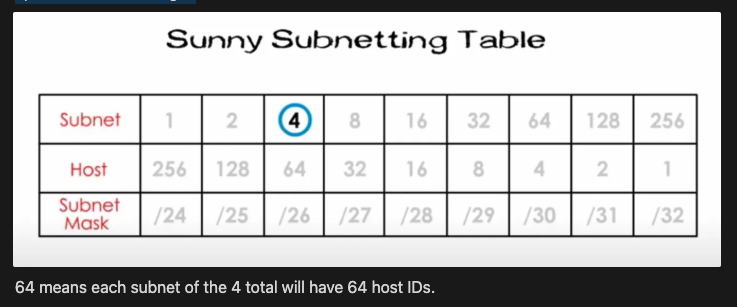
Question: What should you do first when subnetting? Answer: Create a table.
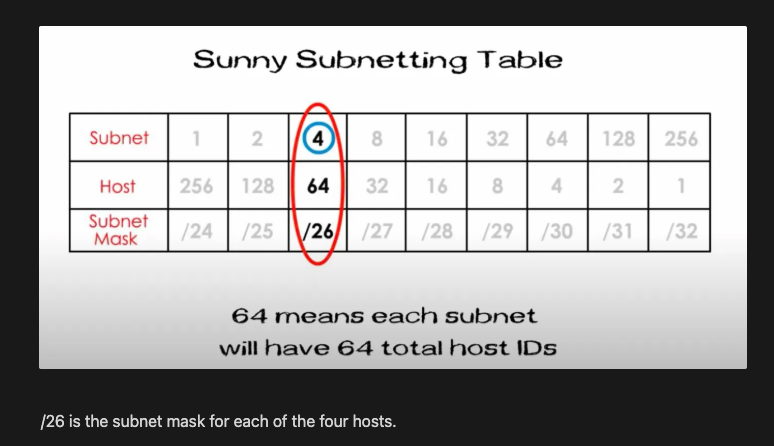
| Subnet | 1 | 2 | 4 | 8 | 16 | 32 | 64 | 128 | 256 |
|---|---|---|---|---|---|---|---|---|---|
| Host | 256 | 128 | 64 | 32 | 16 | 8 | 4 | 2 | 1 |
| Subnet Mask | /24 | /25 | /26 | /27 | /28 | /29 | /30 | /31 | /32 |
From Wikipedia: https://en.wikipedia.org/wiki/Host_(network)
“A network host is a computer or other device connected to a computer network. A host may work as a server offering information resources, services, and applications to users or other hosts on the network. Hosts are assigned at least one network address.
A computer participating in networks that use the Internet protocol suite may also be called an IP host. Specifically, computers participating in the Internet are called Internet hosts. Internet hosts and other IP hosts have one or more IP addresses assigned to their network interfaces. The addresses are configured either manually by an administrator, automatically at startup by means of the Dynamic Host Configuration Protocol (DHCP), or by stateless address autoconfiguration methods.
Network hosts that participate in applications that use the client–server model of computing, are classified as server or client systems. Network hosts may also function as nodes in peer-to-peer applications, in which all nodes share and consume resources in an equipotent manner.”
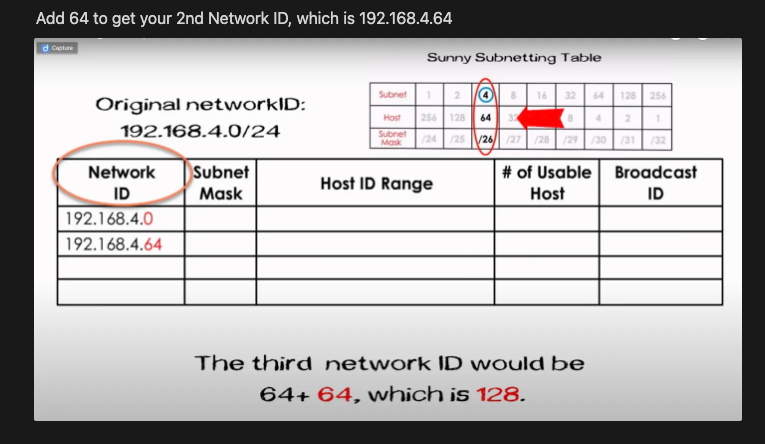
Since in the Sunny example above in the Youtube video, you need 3 subnets, you’d need to go to 4, since 2 is not enough.
Your first network ID will be 192.168.4.0/24
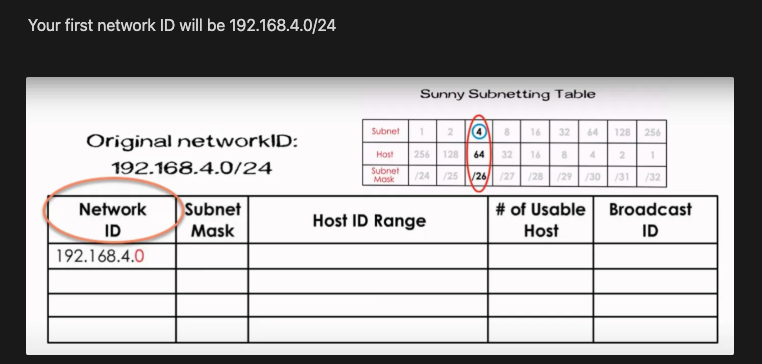
Add 64 to get your 2nd Network ID, which is 192.168.4.64
Tablets
Question: What provides the portability of a mobile phone with the functionality of a laptop or dektop? Answer: A tablet.
Thermal Printers
Question: Ink costs way too much for receipt printers at a string of convenience stores, and you’ve been asked to look into replacing them. What is a likely solution?
Answer: Thermal printers. They are popular at small convenience stores and gas stations.
https://www.newegg.com/Receipt-Printer/SubCategory/ID-3032
Touch Screens
Question: What is the difference between resistive and capacitive touch screens?
Answer: See this article: https://www.electronicdesign.com/technologies/displays/article/21800710/whats-the-difference-between-resistive-and-capacitive-touchscreens
Most touchscreens implement either resistive or projected-capacitance touch technology. Resistive touchscreens, which allow both finger and non-finger input (e.g., glove, stylus), are used in feature phones, global positioning systems (GPS), printers, digital cameras, and larger displays. They generally support single-finger touch and basic gestures, and cost less to produce.
On the other hand, projected-capacitance touchscreens, having superior multi-touch performance, durability, and optical clarity, are usually adopted into smartphones and tablets. However, projected-capacitance touchscsreens are now displacing resistive touch in most small- and medium-sized touchscreen devices, too. Moreover, increasing innovation in projected-capacitance touch, such as integrated stack-ups, has allowed it to be more price-competitive while surpassing resistive touch in performance.
Question: What touch screen technology utilizes two sheets of glass separated by spacers? Answer: Resistive touch screen technology. It utilizes two sheets of glass separated by spacers. When pressure is applied to the top sheet of glass, it bends to make contact with the bottom sheet and type the letter or press the button under the point of contact.
Question: Which touch screen technology uses electrodes that sense the conductive properties of skin? Answer: Capacitive touch screens sense the conductive properties of skin.
USB
Question: What are the five valid USB connector types?
Answer:
Type A
Type B
Type C
Mini-
Micro-USB
Virtualization
Question: You’re rolling out a new virtualized environment, and are asked to size the hardware for optimal performance. Which two components of the server should you optimize?
Answer: CPU cores and RAM.
Question: You’re rolling out a new virtualized environment, and your policy is to always have antivirus and a firewall running on all infrastructure, including virtualized infrastructure, will you need to install antivirus and a virtual firewall on the host, or will the physical server cover the virtualized machines Answer: CPU cores and RAM.
WiFi and Wireless Connectivity
Question: What does NOT specify equipment that uses the 2.4-GHz ISM band?
Answer: 802.11a because operation in the UNII bands automatically makes 802.11a devices incompatible with all other devices complying on the 802.11 series of standards. Systems using 5-GHz frequencies do not communicate with systems using 2.4 -GHz frequencies.
Question: When configuring your home WiFi router, what are some steps you should take when configuring it?
Answer: Configure the WAN/LAN connections, change the default password and SSID, and reserve IPs from outside the DHCP pool for devices that will need static IPs.
Wireless AP Security
Question: In order for the HR department to be able to access confidential records over WiFi. what settings should be configured to allow these requirements?
Answer: WPA2, Infrastructure Mode, and MAC address filtering.
ZIF Connectors
Question: What are ZIF connectors used for?
Answer: ZIF connectors are used to secure delicate ribbon cables, such as FFC (flat flex cables) or FPC (flexible printed circuit) cables. Keyboard ribbon connectors (and others in the notebook) use a Zero Insertion Force socket to secure the connection. You loosen it by lifting the tabs on either side of the socket, or gently working it loose with a small screwdriver.
https://www.ifixit.com/Guide/Recognizing+&+Disconnecting+Cable+Connectors/25629