Launching a successful cold email campaign requires more than crafting compelling messages. The technical aspect of email deliverability plays a critical role in ensuring your emails land in your recipients’ inboxes, not their spam folders. This is where email warm-up comes into play. Proper warm-up practices build your sender reputation with internet service providers (ISPs) and email clients, creating a foundation for effective outreach.
Learn more about cold email best practices on the cold email page.
What Is Email Warm-Up?
Email warm-up is the process of gradually increasing the volume and frequency of emails sent from a new or dormant email account. This helps establish a positive sender reputation with ISPs. Without a warm-up, suddenly sending a high volume of emails can raise red flags, leading to poor deliverability or even blacklisting.
Why Is Warm-Up Important for Cold Email?
Cold email campaigns are inherently challenging because you’re reaching out to recipients who may not be familiar with your brand. A poor sender reputation—caused by skipping or mishandling warm-up—can exacerbate these challenges by significantly reducing the chances of your emails being seen. Proper warm-up ensures that your email account is trusted by mail servers, improving open rates and responses.
How Email Warm-Up Works
Week 1–2: The Foundation Phase
During the initial phase, email volume is kept intentionally low, starting with as few as 10-20 emails per day. These emails should ideally be sent to verified, engaged contacts who are likely to open, reply, and interact positively. Automated tools simulate this engagement to mimic organic behavior.
Key practices during this phase:
- Consistent Sending: Send emails at regular intervals to establish a pattern.
- Focus on Replies: Engagement, such as replies or opens, signals to ISPs that you’re a legitimate sender.
- Gradual Increase: Email volume is increased incrementally—by about 5-10 additional emails per day.
Week 3–4: Scaling Up
Once ISPs recognize your sending pattern as trustworthy, you can begin increasing the volume more significantly. By the end of the first month, most email warm-up tools allow you to send 50-100 emails per day.
Key milestones:
- Gradual increase to ensure ISPs don’t suspect unusual activity.
- Continued emphasis on engagement to solidify your reputation.
Post Warm-Up: Sustained Outreach
After the initial warm-up period, email accounts can handle a larger volume of emails, ranging from 200 to 500+ emails per day, depending on your domain’s age and reputation. Even at this stage, it’s important to monitor performance metrics closely to avoid deliverability issues.
Tools for Email Warm-Up
Several providers offer automated warm-up services, ensuring your email account builds a strong reputation efficiently:
1. Smartlead – https://www.smartlead.ai/
Smartlead automates the entire warm-up process by connecting to your email account and gradually increasing email volume. Its AI-driven engagement system ensures emails are opened and replied to, simulating real conversations. Smartlead also provides detailed reports on your sender reputation.
2. Mailtoaster – https://mailtoaster.ai/
Mailtoaster focuses on creating realistic engagement by partnering your emails with a network of accounts. These accounts open, reply, and interact with your emails, signaling positive behavior to ISPs. Mailtoaster also lets users customize their warm-up schedule based on specific campaign goals.
3. Warmbox – https://app.warmbox.ai/
Warmbox uses real email accounts within its network to ensure natural interactions. It provides insights into your sender reputation and adjusts the warm-up process dynamically.
4. Lemwarm (by Lemlist) – https://www.lemwarm.com/
A popular choice for startups and SMBs, Lemwarm integrates directly with your email campaigns. It simulates real-life email behavior by interacting with your messages, which improves your deliverability over time.
5. Warmup Inbox – https://www.warmupinbox.com/
This tool specializes in creating a network of accounts that interact with your emails. Its analytics dashboard tracks the health of your email reputation, offering actionable recommendations to maintain high deliverability. See the full article and how-to at https://infinitekb.com/warmup-inbox
5. Apollo Ramp-Up
Apollo’s email warm-up feature, called Inbox Ramp-Up, is an automated solution designed to improve email deliverability. It works by gradually increasing the number of emails sent per day over a two-week period. This process adheres to best practices recommended by email providers like Google and Microsoft.
The Inbox Ramp-Up process in Apollo works as follows:
- Enable Ramp-Up: Users can enable the feature for their connected mailboxes in the Apollo dashboard.
- Gradual Increase: The system automatically increases the daily email sending volume over time[7].
- Duration: The warm-up process typically lasts for two weeks[1][2].
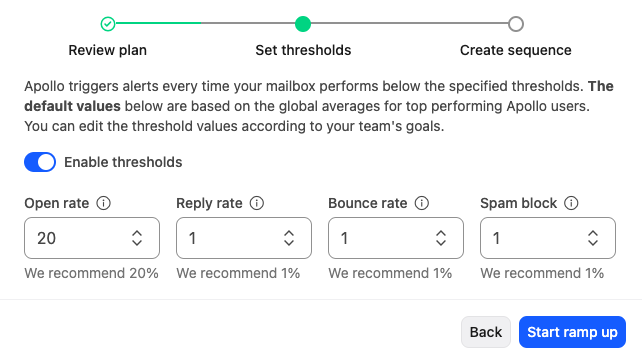
- Threshold Setting: Users can set thresholds for metrics like reply rate, open rate, bounce rate, and spam block rate to receive notifications if these fall below certain levels[2].
- Sequence Connection: The warm-up process needs to be connected to an email sequence in Apollo.
To maximize the effectiveness of the warm-up process, Apollo recommends:
- Running Inbox Ramp-Up for every mailbox connected to Apollo.
- Asking close contacts to respond to and forward your emails, as mailbox providers track opens and clicks to determine email relevance.
It’s important to note that if you’re already sending a high volume of emails through a particular account, enabling Ramp-Up will throttle that account for the next two weeks to ensure proper warming.
Slide the slider to the right during new user onboarding.

Select Enable thresholdsd, and leave the recommended settings.
Best Practices for a Successful Warm-Up
- Start Slow: Avoid jumping into high-volume email campaigns immediately.
- Monitor Metrics: Regularly check for spam complaints, bounce rates, and other indicators of reputation health.
- Maintain Engagement: Continue interacting with recipients even after the warm-up period to sustain your reputation.
- Segment Campaigns: Group your outreach by audience type for more targeted messaging.
In Summary
Email warm-up is an essential step for any cold email strategy. By investing time and resources into warming up your accounts, you ensure your campaigns achieve maximum deliverability and engagement. Tools like Smartlead, Mailtoaster, and others simplify the process, allowing you to focus on your outreach strategy rather than the technical nuances of email deliverability.
Need help with email campaign strategy? Fill out the Contact Us form.
How Do Providers Warm Up Inboxes?
Cold email providers achieve high reply rates during the process of warming up inboxes through a combination of best practices and specific strategies designed to build the reputation of the email domain and ensure deliverability. Here’s how they typically achieve this:
1. Engaging in High-Quality, Realistic Conversations
- Providers use automated tools to mimic real email interactions. These tools send emails to and receive responses from other users (often within a network of accounts).
- The replies are realistic, engaging, and contextually relevant to avoid triggering spam filters.
2. Using Warm-Up Tools
- Tools like Mailwarm, Warmbox, or Lemwarm send emails between accounts in the tool’s network. These tools automate responses, ensuring a back-and-forth exchange that looks natural to email providers.
- The tools also mark messages as “Not Spam” and star emails when necessary, further improving sender reputation.
3. Personalization
- Even during warm-up phases, providers often add personalization elements to their templates. For example:
- Addressing the recipient by name.
- Referencing a specific context or topic to make the emails appear genuine.
4. Gradual Scaling
- They start by sending a small number of emails per day and gradually increase the volume. This avoids overwhelming the server and mimics the behavior of a growing, legitimate business.
- For example, they might start with 10 emails per day and increase to hundreds over several weeks.
5. Clean Sender Lists
- Ensuring that emails are sent to valid addresses prevents bounces, which can harm domain reputation. Validation tools like ZeroBounce or NeverBounce are often used for this purpose.
6. Using Established Domains
- Warm-up providers might use older domains with an existing good reputation or subdomains tied to the main business domain.
- They ensure the DNS settings (SPF, DKIM, DMARC) are configured properly.
7. Regular Monitoring and Feedback
- They monitor engagement metrics (open rates, reply rates, bounce rates) closely to adjust their strategy.
- Tools often provide insights into spam scores and inbox placement to fine-tune email content and sending behavior.
8. Behavior Mimicking
- During warm-up, the content of emails might include diverse subjects to emulate the types of emails a real user would send (e.g., questions, updates, and casual conversations).
- Replies vary in length and tone, making the exchange appear human-like.
9. Inbox Placement and Avoiding Spam Traps
- Providers avoid using spammy keywords or heavy HTML content during warm-ups.
- They often focus on plain text emails that are concise and free from suspicious links or attachments.
Why the 40% Reply Rate?
The high reply rate during warm-up isn’t necessarily indicative of actual cold outreach performance but rather a result of:
- Artificially constructed interactions within controlled environments.
- Networks of accounts designed to interact with each other, ensuring positive metrics.
This process builds the domain’s and IP’s reputation, making it more likely that real outreach emails will land in inboxes rather than spam folders.