If you want to learn the basics of email marketing, go to https://infinitekb.com/email
You’ll also want to bookmark the cold email subReddit https://www.reddit.com/r/coldemail/ and take in everyone’s opinions, keeping in mind that they typically have only used one or two tools for email outreach. Three of the more common email automation and lead generation tools you see the most on the subreddit are: Instantly, Smartlead, and PIPL.AI.
When it comes to cold email, you’ll want to think about the following:
- Personalization:
- Tailored Content: Customize your emails based on recipient information, such as their role, company, and interests. For a good tutorial on tailored content with an outreach content, see the Clay video that uses Smartlead for outreach as an example. https://www.clay.com/university/lesson/personalized-direct-email-campaigns-step-by-step-walkthrough-with-smartlead-automated-outbound
- Dynamic Fields: Use merge tags to insert personalized details like the recipient’s name or company.
- Segmentation: Group your audience based on common characteristics to send more relevant messages.
- Subject Lines:
- Curiosity: Craft intriguing subject lines that pique curiosity without being clickbait.
- Clarity: Be clear about the email’s purpose to avoid confusion.
- A/B Testing: Experiment with different subject lines to find what resonates best.
- Body Content:
- Value Proposition: Clearly state the value you offer and how it benefits the recipient.
- Short and Sweet: Keep emails concise; focus on the main points.
- Call to Action (CTA): Include a clear CTA, whether it’s scheduling a call, downloading content, or visiting a webpage.
- Response Rates:
- Benchmarking: Understand industry averages for response rates to set realistic expectations. https://www.salesforce.com/marketing/email/benchmarks/
- Follow-Up Strategy: Plan follow-up emails to increase chances of engagement.
- Timing: Experiment with different days and times to find optimal send times.
- Avoiding Spam Filters:
- Avoid Spam Trigger Words: Words like “free,” “urgent,” or excessive exclamation marks can trigger spam filters.
- Authentication: Set up SPF, DKIM, and DMARC records to improve email deliverability.
- Clean Lists: Regularly clean your email list to remove inactive or invalid addresses.
- Relationship Building:
- Warm-Up Sequence: Gradually introduce yourself before making a direct ask.
- Provide Value: Share helpful resources or insights to build credibility.
- Social Proof: Mention any relevant achievements, testimonials, or partnerships.
Successful cold email campaigns require a mix of strategy, persistence, and genuine connection.
Best Practices for Warming Up Domains for Cold Email Campaigns
When running cold email campaigns, domain warm-up is essential to ensure that your emails land in your target audience’s inbox, rather than being flagged as spam. A cold email domain that’s not warmed up can quickly find its emails ending up in the dreaded “junk” folder, reducing the effectiveness of your campaigns and damaging your sender reputation.
Here’s a detailed guide on the best practices for warming up your domain to improve the deliverability and success of your cold email campaigns.
Why Domain Warm-Up Matters
Warming up a domain means gradually building up your sending reputation with internet service providers (ISPs) like Gmail, Outlook, and Yahoo. When you start sending emails from a new domain, ISPs are wary of mass emails, assuming you might be spamming. A sudden high volume of emails from a new or dormant domain will trigger spam filters, potentially landing your emails in the spam folder.
Properly warming up your domain builds trust with these ISPs, signaling that you’re a legitimate sender with good intentions. Here’s how to do it the right way.
Start with a New Dedicated Domain
If your main business domain is new or has been inactive, it’s wise to register a separate, dedicated domain or subdomain just for cold emailing. This protects your main domain’s reputation in case of any deliverability issues.
For instance, if your company website is yourbusiness.com, consider using yourbusinessmail.com or email.yourbusiness.com. Ensure this new domain matches your branding but is reserved solely for outreach to safeguard your core domain.
When using cold emails for outreach, protecting your sender domain is crucial to avoid being marked as spam and to maintain deliverability. If one domain gets “burned” (i.e., flagged or blacklisted due to misuse or spam complaints), having a strategy to manage this risk is essential. Here are some best practices for domain registration and management to mitigate issues with domain reputation:
Use Multiple Domains/Subdomains
- Consider having multiple domains registered specifically for cold email outreach. You can rotate these domains periodically to avoid overusing any one domain.
- Best Practice: Don’t send too many emails from a single domain too quickly. If a domain starts showing signs of bad reputation, switch to another one before it gets flagged.
- A rule of thumb is to use two to three domains for cold outreach at a time, and rotate them every 3–6 months.
Monitor Spam Complaints and Replies
- Keep an eye on the number of spam complaints and unsubscribe requests. If you receive a significant number, it could indicate that your cold emailing practices need to be adjusted.
- Tools like Reply.io, Lemlist, or Woodpecker can help you manage replies and monitor complaints, making sure you don’t go overboard with your outreach.
Email List Hygiene
- Regularly clean your email lists to remove invalid, outdated, or unengaged contacts. Using email validation tools (like NeverBounce or ZeroBounce, Leadmagic.IO) can help ensure that you’re not sending to invalid email addresses, which can negatively impact your reputation.
- Don’t send emails to users who have already unsubscribed or marked you as spam in the past.
Comply with Email Regulations (GDPR, CAN-SPAM, etc.)
- Follow proper cold email outreach regulations such as the CAN-SPAM Act (in the U.S.) or GDPR (in Europe). Ensure that your emails have proper opt-out mechanisms and that you’re respectful of recipient preferences.
- Include an easy way to opt out of your communications to avoid complaints and possible blacklisting.
Contingency Plan if a Domain Gets Burned
- Immediate Actions:
- Switch to a new domain as soon as you notice a decline in deliverability or a burned domain.
- Pause campaigns temporarily to assess your email practices.
- Review your email content, targeting, and list hygiene practices to identify what caused the issue.
- Domain Reclamation:
- If you want to rehabilitate a burned domain, you can attempt to repair its reputation. This can take months, but it involves sending low-volume, highly engaging emails and gradually re-establishing trust with major email providers.
Set Up Proper Email Authentication
For a more detailed overview on email authentication, go to our page on email authentication.
To improve your domain’s credibility with ISPs, set up email authentication protocols that verify your identity as the sender. This is crucial for reducing the chances of your emails being marked as spam.
Key authentication protocols to configure include:
- SPF (Sender Policy Framework): Defines which mail servers are authorized to send emails on behalf of your domain.
- DKIM (DomainKeys Identified Mail): Adds a digital signature to your email headers to verify that the message hasn’t been altered.
- DMARC (Domain-based Message Authentication, Reporting & Conformance): Provides instructions to ISPs on how to handle unauthenticated emails sent from your domain.
These protocols ensure ISPs know your emails are authentic and can be trusted.
Warm Up Slowly and Steadily
When you start sending emails from a new domain, you should increase the volume gradually over time. Abruptly sending out thousands of emails from a new domain raises red flags with ISPs.
Suggested warm-up schedule:
- Week 1: Send 10-20 emails per day.
- Week 2: Increase to 30-50 emails per day.
- Week 3: Gradually move to 100-200 emails per day.
- Week 4+: Continue increasing until you reach your desired volume, ensuring that the engagement rates remain high.
During this period, prioritize sending emails to people likely to engage with them—employees, colleagues, friends, or small, targeted lists of leads.
Focus on Quality, Not Quantity
While the goal is to gradually increase your email volume, don’t sacrifice quality for the sake of numbers. Craft personalized, engaging, and valuable content that resonates with your recipients. If people engage with your emails—open them, click on links, reply, or forward them—ISPs will interpret this as a signal of trust, boosting your sender reputation.
Avoid spammy keywords (e.g., “free,” “buy now,” “limited offer”) and generic copy in your subject lines and email bodies. Instead, focus on delivering value and relevant information to your prospects.
Monitor Your Engagement Metrics
During the warm-up process, it’s vital to closely monitor your email engagement metrics, as they directly affect your sender reputation. Key metrics to track include:
- Open rates: Higher open rates indicate good deliverability and relevant content.
- Click-through rates (CTR): A high CTR suggests that your email content is compelling.
- Bounce rates: Ensure your bounce rate stays below 5% to avoid being flagged as a spammer.
- Spam complaints: Minimize complaints by always including an easy way for people to unsubscribe.
If you notice a drop in any of these metrics, it could signal that your domain reputation is at risk, and you should slow down your email volume or review your content.
Monitor and Improve Sender Reputation
Tools like Google Postmaster Tools, Microsoft SNDS, or third-party services like SenderScore can help you monitor your sender reputation. These tools provide valuable insights into how ISPs view your domain and emails.
If your sender score drops or you notice deliverability issues, take corrective action by reducing email volume, improving content, and focusing on engaged recipients.
Email Rotation
Sales engagement software like Smartlead or Instantly typically manages email rotation to help sales teams maintain a more efficient and personalized outreach strategy. Here’s how it generally works:
1. Multiple Email Templates
- Variety of Templates: The software allows sales teams to create multiple email templates for different outreach scenarios, like cold emails, follow-ups, and responses. These templates can be customized for various buyer personas.
- Automated Rotation: The software can rotate these templates automatically, ensuring that each prospect receives a slightly different version of the message. This prevents overuse of the same message, which can seem robotic or repetitive.
2. Randomized or Rule-Based Rotation
- Randomized Rotation: Some systems rotate the email templates randomly to ensure each prospect gets a unique experience. This can make it feel more human and less automated.
- Rule-Based Rotation: Other systems might rotate emails based on predefined rules, such as the stage of the sales cycle or the prospect’s behavior. For example, a follow-up email might be sent with one template after a few days if there’s no response, while another might be triggered if the prospect clicked on a link.
3. A/B Testing
- Sales engagement platforms often include features for A/B testing, where different email versions are sent to different prospects to determine which template, subject line, or approach garners the best results. Over time, the system might even optimize the rotation based on the results of these tests.
4. Personalization and Dynamic Fields
- Many systems allow for dynamic variables in emails, such as the prospect’s name, company, or other specific details, which are automatically populated into the template. This helps in maintaining personalization despite the rotation of different email versions.
5. Email Sending Timing
- In addition to rotating templates, sales engagement platforms also help with rotating the timing of email sends. This might include sending emails at different times of day or on different days of the week to increase the likelihood of engagement.
6. Tracking & Adjusting
- After sending a sequence of rotated emails, the software tracks the performance of each version, like open rates, click-through rates, and responses. This data can help adjust the email rotation for future outreach to make it more effective.
In short, email rotation in sales engagement software is about keeping things fresh, varied, and personalized. The goal is to avoid sending repetitive, cookie-cutter emails while improving the likelihood of getting a positive response from prospects. Does this answer your question? Let me know if you need more details on any aspect!
Include a Call To Action in the First Email
Including a Call to Action (CTA) in the first cold email is crucial for deliverability and engagement. Here’s why:
1. Avoids Spam Filters
- Emails with no links or CTA can appear too generic or suspicious, triggering spam filters.
- A clear, natural CTA (e.g., “Let me know if this interests you” or “Can we set up a quick call?”) helps show engagement intent.
2. Increases Engagement Signals
- Replies, clicks, and interactions tell email providers (Google, Outlook, etc.) that your emails are valuable and wanted.
- Higher engagement boosts sender reputation, improving deliverability for future emails.
3. Sets the Expectation for the Next Steps
- If the recipient doesn’t know what to do, they won’t act.
- A clear CTA (like “Would you be open to a quick chat Thursday?”) helps guide them.
4. Filters Interested Leads Early
- If you include a CTA, you’ll quickly identify engaged prospects versus non-responders.
- This helps optimize follow-ups and improve conversion rates.
5. Warms Up Future Emails
- If they engage with the first email, future emails are less likely to land in spam since they’ve already interacted with you.
Would you like some CTA examples tailored to your campaigns?
Conclusion
Warming up your domain is a crucial step in running successful cold email campaigns. By starting slowly, focusing on engagement, and maintaining clean email lists, you’ll build a solid sender reputation that boosts deliverability. When done right, these efforts will lead to more conversions and a higher return on investment from your cold email outreach.
Take the time to warm up your domain and follow these best practices for long-term success in your cold email marketing efforts.
Smartlead has compiled some of the top performing cold email tips on their website. Check them out at https://www.smartlead.ai/blog/cold-email-templates
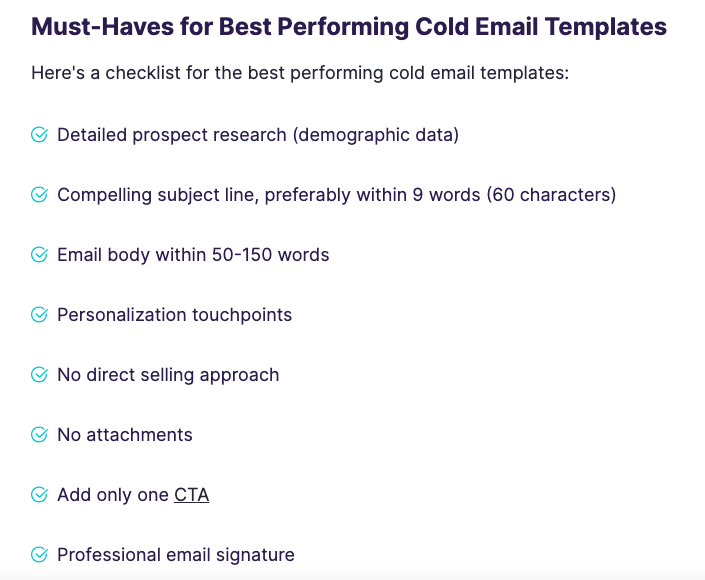
Here’s a good shortlist of tips that a cold email agency posted on Reddit:
Hi Guys, I see that some people are struggling here with deliverability and email setup in general so here’s the game plan straight out of an agency considered a power user of Smartlead and Clay:
If you’re struggling with cold email deliverability, I’m going to break down what’s actually working for us right now. This isn’t theory — these are our agency’s internal ops:
- Inbox Army We always buy 100 inboxes — spread across 3 different providers (manually, never through third-party vendors). Diversification here is key. Providers like Google Workspace, and Outlook work well.
- Batch Rotation We split the 100 inboxes into Batch A & Batch B. We only use Batch A for 3 months and rotate every month. This minimizes burnout and helps keep sender scores high.
- Spintax Everything At a minimum, we use 3 spintax variations for every line of copy. Even better: we implement liquid spintax to hyper-personalize emails (e.g., dynamic merge fields that adjust based on prospect data). This makes every email unique.
- Triple Verified Lead Lists Garbage in = garbage out. We triple verify all leads (ZeroBounce, NeverBounce, etc.) and use Clay.com to enrich data like job titles, tech stack, or recent company news. Clean lists = fewer bounces.
- Job Post Leads? Live Feeds Win. For staffing/recruitment offers, we pull live job posts using Apify. Fresh leads = better relevance = higher replies.
- Dedicated Sending Strategy
- 10 inboxes for cold outreach
- 10 inboxes for follow-ups
- 30 inboxes solely for warm-up per day Keeping sending volumes low per inbox avoids hitting spam triggers.
- Plain Text, Always Fancy emails kill deliverability. We send plain text emails with a 10-15 minute delay between sends. Feels natural, not automated.
- Testing Framework When testing campaigns, we contact 1,000 unique leads. That’s enough data to spot winners. Cut the underperformers quick and let the winners run.
- Multiple Campaigns from Day 1 Always launch with more than 1 campaign. Some will flop, some will surprise you. Let the market decide.
- Domains Without Your Brand Name Secondary domains should not include your company name. We’ve seen this single-handedly wreck deliverability when one domain gets flagged.
Bonus Tips We’ve Learned Along the Way:
- Warm-Up Never Stops: Tools like Smartlead, Lemwarm, or Mailreach are mandatory for inbox health. Don’t skimp.
- Lower Your Sending Limits: Start slow (5-10 emails per inbox/day) and scale over weeks. Going aggressive too soon = instant spam folder.
- Engage With Replies: Don’t leave responses hanging. Quick, human-like follow-ups signal to ESPs that your inbox is active and legit.
- Time of Day Matters: Test sending windows (morning vs. afternoon) to see what sticks for your audience.